WHAT’S NEW

CommCare keeps getting better

Product updates and what’s coming next, all in one place.

PRODUCT UPDATES

Latest product updates

The newest features across CommCare HQ, Web Apps and Mobile.

Oct 12, 2026 · CommCare HQ

Bulk Form Action API: Archive and Delete Forms in Bulk

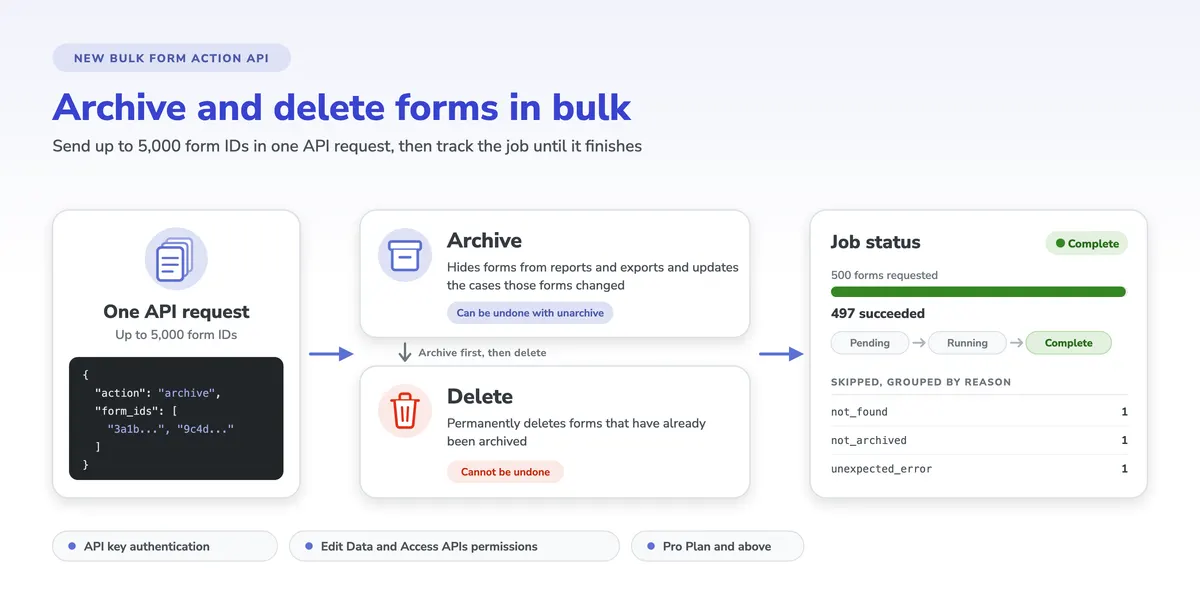
The new Bulk Form Action API lets you archive or delete up to 5,000 forms with a single API request, and unarchive forms you archived earlier. Each request starts a background job, and the API gives you a status link to follow the job until it finishes. Read more in the Bulk Form Action API documentation.

Big release
Oct 11, 2026 · CommCare HQ

Page-aware answers from the CommCare Companion

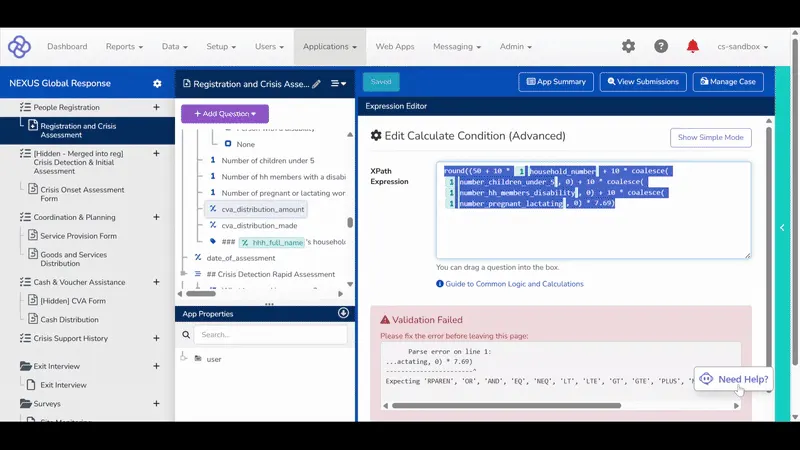
The CommCare Companion, the AI assistant in CommCare HQ, now uses the page you are working on to answer your questions. Starting with the App Builder pages, the Companion receives the page you are on, your project space, and your role, so its answers match what you are looking at.

Sep 8, 2026 · Data Export Tool

CommCare Data Export Tool 1.16.0: Export to Data Lakes

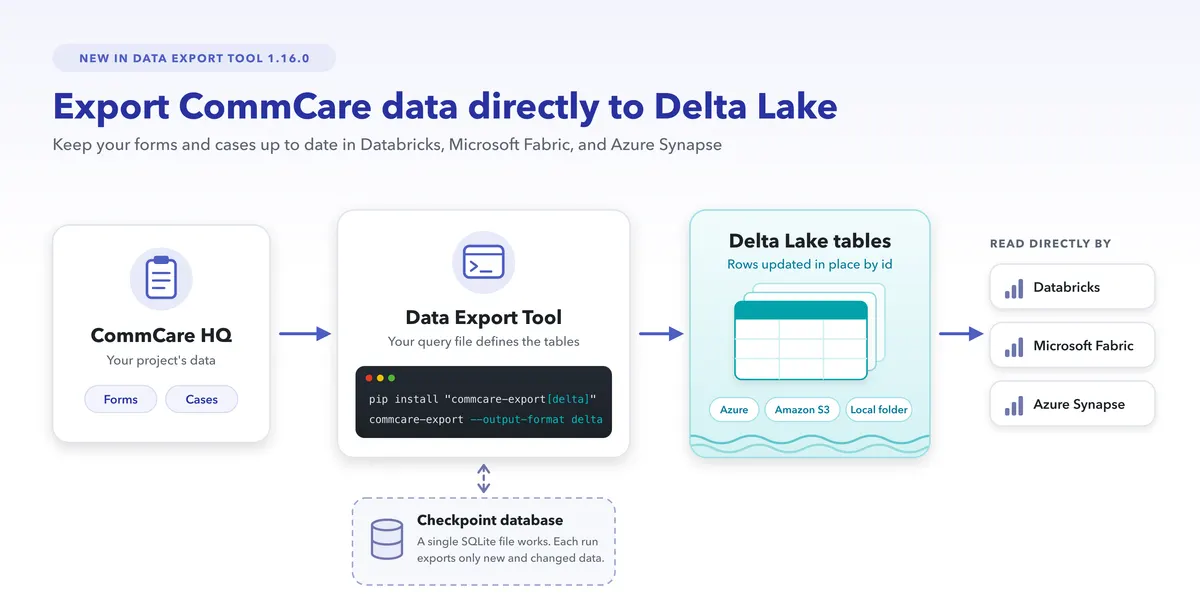
Version 1.16.0 of the CommCare Data Export Tool can export your CommCare data as Delta Lake tables, which Databricks, Microsoft Fabric, and Azure Synapse can read directly, so teams that analyze data in those platforms can keep their CommCare data up to date there on a schedule.

Shipped Oct 12, 2026

Bulk Form Action API: Archive and Delete Forms in Bulk

Screenshot: Bulk Form Action API: Archive and Delete Forms in Bulk

The new Bulk Form Action API lets you archive or delete up to 5,000 forms with a single API request, and unarchive forms you archived earlier. Each request starts a background job, and the API gives you a status link to follow the job until it finishes. Read more in the Bulk Form Action API documentation.

What’s included

  • Archive forms in bulk: Archiving hides forms from reports and exports and updates the cases those forms changed, and the unarchive action reverses the archiving.
  • Delete forms in bulk: Deleting permanently removes forms that have already been archived and cannot be undone, so you archive forms in one request and delete them in a second request.
  • Up to 5,000 forms per request: Each request accepts up to 5,000 form IDs, and larger sets can be sent as several requests.
  • Clear job results: The status link shows whether a job is pending, running, complete, or failed, how many forms succeeded, and which forms were skipped and why.

Want to see it in action, or check if it fits your program?

Get in Touch
CommCare HQBig releaseAll plans
Shipped Oct 11, 2026

Page-aware answers from the CommCare Companion

Screenshot: Page-aware answers from the CommCare Companion

The CommCare Companion, the AI assistant in CommCare HQ, now uses the page you are working on to answer your questions. Starting with the App Builder pages, the Companion receives the page you are on, your project space, and your role, so its answers match what you are looking at.

Want to see it in action, or check if it fits your program?

Get in Touch
Data Export ToolPro plan and above
Shipped Sep 8, 2026

CommCare Data Export Tool 1.16.0: Export to Data Lakes

Screenshot: CommCare Data Export Tool 1.16.0: Export to Data Lakes

Version 1.16.0 of the CommCare Data Export Tool can export your CommCare data as Delta Lake tables, which Databricks, Microsoft Fabric, and Azure Synapse can read directly, so teams that analyze data in those platforms can keep their CommCare data up to date there on a schedule. Delta Lake export requires installing the Data Export Tool with pip, because the pre-built Windows executable does not include it. Setup steps are in the Export to a Data Lake section of the CommCare Data Export Tool wiki page, and the full list of changes is in the Data Export Tool changelog.

What’s included

  • Delta Lake output: The Data Export Tool writes each table in your query file as a Delta Lake table in cloud storage, such as Azure or Amazon S3, or in a local folder.
  • Rows updated in place: Each run updates existing rows and adds new ones, matching rows by their id column, so every table in your query file needs an id column.
  • Only new and changed data: When you give the Data Export Tool a checkpoint database, which can be a single SQLite file, each run exports only the data that changed since the last successful run. Without a checkpoint database, every run starts the export over from the beginning.
  • Faster SQL exports: Exports to SQL databases are now faster and use less memory.
  • Python support: The Data Export Tool now supports Python 3.14 and no longer supports Python 3.9.

Want to see it in action, or check if it fits your program?

Get in Touch
Fall 2026 webinar · live online

Join us for our fall product updates

How many hours does your team lose to translation files, clearing out forms and hunting for answers? Join our live demos of new features designed to give some of that time back, plus Q&A.

Thursday, November 19 · 9:00 AM ET / 2:00 PM GMT / 7:30 PM IST

What's New in CommCare, Fall 2026 webinar, with Kai Cowger, Senior Director of Product and Technology, Sarah Strauss, Product Marketing Lead, and Rishabh Rath, Director of Sales Engineering
ROADMAP

What’s coming next

Our biggest releases in the works. The full roadmap has everything we’re building and the ideas we’re exploring.

Big release · Coming soon
Apps, forms and mobile

Public Webforms

Let people outside your project fill out a registration or survey form in a web browser, without a CommCare account.

Big release · Coming soon
Apps, forms and mobile

Template Application Library

Ready-made CommCare apps, built by Dimagi, that you can copy into your project and make your own.

Big release · Coming soon
Data and integrations

Next-generation data pipeline

A live, analysis-ready copy of your CommCare data that your reporting tools and data warehouse can use directly.

Building nowBig releaseAdvanced plan and above

Public Webforms

Let anyone fill out your form, no CommCare account needed.

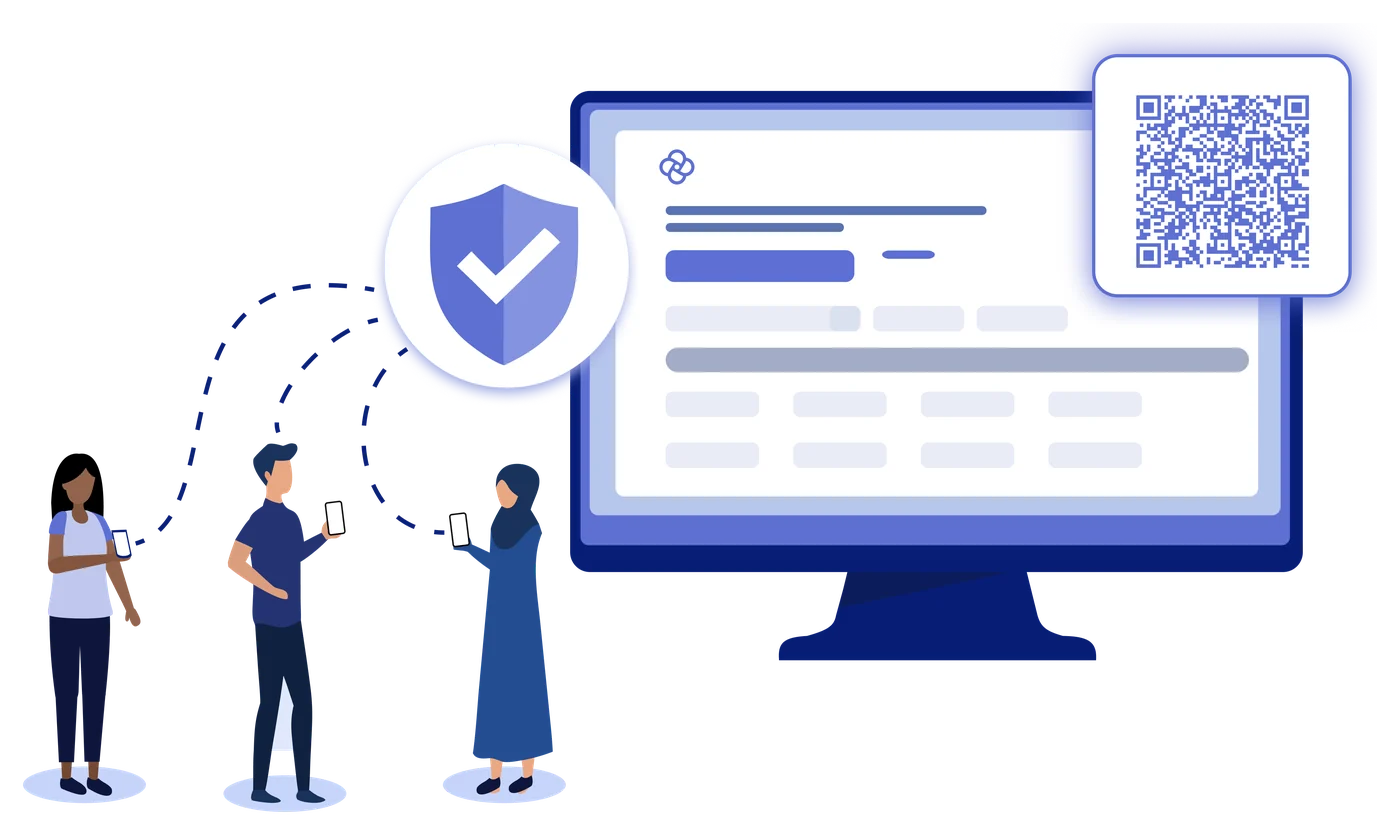
People registering through a form on a screen with a QR code

Public Webforms let people outside your project fill out a registration or survey form from your CommCare app in a web browser. A clinic can put a QR code in its waiting room so patients can register themselves, or a program can send a feedback survey link to the people it serves.

How it works

  1. PublishPublish a registration or survey form to a public link.
  2. ShareShare the link or its QR code by email, text message, on a website or on a printed poster.
  3. RespondEach respondent requests a one-time link by email or text message, good for one submission.
  4. CollectEvery submission saves to your project, and each registration creates a new case.
  • You choose when a form stops accepting responses, and you can close or reopen it at any time.

Want to know more, or see if this fits your program?

Get in Touch
Building nowBig releaseAdvanced plan and above
2026 priority: an app library

Template Application Library

Start from a proven app, not a blank canvas.

With smaller teams, starting from a blank canvas can limit what organizations take on. The Template Application Library gives you proven, customizable foundations, so it’s faster to build new apps and start new use cases without rebuilding from scratch.

How it works

  • Browse ready-made apps, built by Dimagi, right in CommCare HQ.
  • Templates are organized by sector, and each one describes what the app does.
  • Copy a template into your project and customize it for your program.
  • Use templates to learn CommCare, start a new use case, or speed up an existing program.

Want to know more, or see if this fits your program?

Get in Touch
Building nowBig releaseAll plans
2026 priority: a new data pipeline

Next-generation data pipeline

Act on your data in the tools you already use.

As your data grows, you need CommCare to work with your reporting tools and data warehouses. The CommCare Data Pipeline automatically and continuously mirrors your CommCare data into a standard database, giving you a real-time, analysis-ready copy without manual exports. It is also the foundation for a secure, AI-powered experience with your data.

What it gives you

  • A live copy of your data that stays up to date on its own, with no manual exports.
  • Connect reporting tools such as Power BI or Tableau straight to it.
  • Full control of your data for long-term warehousing and advanced analysis, while CommCare itself stays fast.
  • Individuals and small teams can install it as an app on Windows, Mac or Linux.

Want to know more, or see if this fits your program?

Get in Touch
TALK TO OUR TEAM

Questions about what’s coming?

Schedule a call to talk through the roadmap and what it means for your program.

Schedule a call
LET’S TALK

Have questions about what’s new in CommCare?