PRODUCT UPDATES

CommCare product updates

The biggest releases of 2025 and 2026, and every change back to 2019.

Updated October 28, 2026 from our code, roadmap and release notes.

This year

2026: A year of unlocking potential

Helping every organization and every user put the full power of CommCare to work, from AI that understands the page you are on to data that flows straight into your own tools.

Screenshot: Bulk Form Action API: Archive and Delete Forms in Bulk
CommCare HQOct 12, 2026

Bulk Form Action API: Archive and Delete Forms in Bulk

The new Bulk Form Action API lets you archive or delete up to 5,000 forms with a single API request, and unarchive forms you archived earlier. Each request starts a background job, and the API gives you a status link to follow the job until it finishes. Read more in the Bulk Form Action API documentation.

  • Archive forms in bulk
  • Delete forms in bulk
  • Up to 5,000 forms per request
Shipped Oct 12, 2026

Bulk Form Action API: Archive and Delete Forms in Bulk

Screenshot: Bulk Form Action API: Archive and Delete Forms in Bulk

The new Bulk Form Action API lets you archive or delete up to 5,000 forms with a single API request, and unarchive forms you archived earlier. Each request starts a background job, and the API gives you a status link to follow the job until it finishes. Read more in the Bulk Form Action API documentation.

What’s included

  • Archive forms in bulk: Archiving hides forms from reports and exports and updates the cases those forms changed, and the unarchive action reverses the archiving.
  • Delete forms in bulk: Deleting permanently removes forms that have already been archived and cannot be undone, so you archive forms in one request and delete them in a second request.
  • Up to 5,000 forms per request: Each request accepts up to 5,000 form IDs, and larger sets can be sent as several requests.
  • Clear job results: The status link shows whether a job is pending, running, complete, or failed, how many forms succeeded, and which forms were skipped and why.

Want to see it in action, or check if it fits your program?

Get in Touch
Screenshot: Page-aware answers from the CommCare CompanionBig release
CommCare HQOct 11, 2026

Page-aware answers from the CommCare Companion

The CommCare Companion, the AI assistant in CommCare HQ, now uses the page you are working on to answer your questions. Starting with the App Builder pages, the Companion receives the page you are on, your project space, and your role, so its answers match what you are looking at.

CommCare HQBig releaseAll plans
Shipped Oct 11, 2026

Page-aware answers from the CommCare Companion

Screenshot: Page-aware answers from the CommCare Companion

The CommCare Companion, the AI assistant in CommCare HQ, now uses the page you are working on to answer your questions. Starting with the App Builder pages, the Companion receives the page you are on, your project space, and your role, so its answers match what you are looking at.

Want to see it in action, or check if it fits your program?

Get in Touch
Screenshot: CommCare Data Export Tool 1.16.0: Export to Data Lakes
Data Export ToolSep 8, 2026

CommCare Data Export Tool 1.16.0: Export to Data Lakes

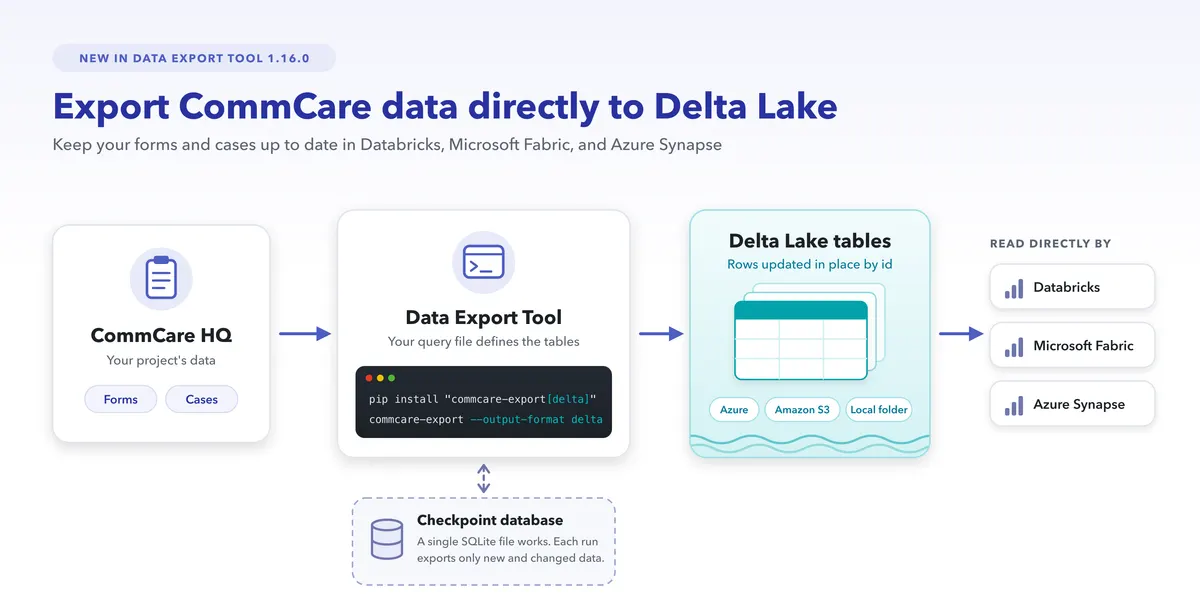
Version 1.16.0 of the CommCare Data Export Tool can export your CommCare data as Delta Lake tables, which Databricks, Microsoft Fabric, and Azure Synapse can read directly, so teams that analyze data in those platforms can keep their CommCare data up to date there on a schedule.

  • Delta Lake output
  • Rows updated in place
  • Only new and changed data
Data Export ToolPro plan and above
Shipped Sep 8, 2026

CommCare Data Export Tool 1.16.0: Export to Data Lakes

Screenshot: CommCare Data Export Tool 1.16.0: Export to Data Lakes

Version 1.16.0 of the CommCare Data Export Tool can export your CommCare data as Delta Lake tables, which Databricks, Microsoft Fabric, and Azure Synapse can read directly, so teams that analyze data in those platforms can keep their CommCare data up to date there on a schedule. Delta Lake export requires installing the Data Export Tool with pip, because the pre-built Windows executable does not include it. Setup steps are in the Export to a Data Lake section of the CommCare Data Export Tool wiki page, and the full list of changes is in the Data Export Tool changelog.

What’s included

  • Delta Lake output: The Data Export Tool writes each table in your query file as a Delta Lake table in cloud storage, such as Azure or Amazon S3, or in a local folder.
  • Rows updated in place: Each run updates existing rows and adds new ones, matching rows by their id column, so every table in your query file needs an id column.
  • Only new and changed data: When you give the Data Export Tool a checkpoint database, which can be a single SQLite file, each run exports only the data that changed since the last successful run. Without a checkpoint database, every run starts the export over from the beginning.
  • Faster SQL exports: Exports to SQL databases are now faster and use less memory.
  • Python support: The Data Export Tool now supports Python 3.14 and no longer supports Python 3.9.

Want to see it in action, or check if it fits your program?

Get in Touch
Screenshot: Face Capture
CommCare MobileAug 17, 2026

Face Capture

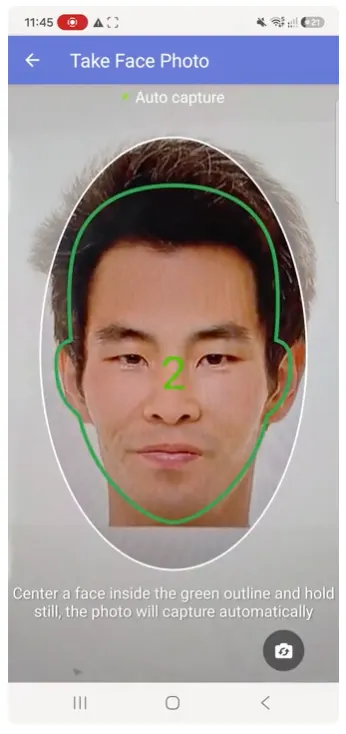
The new Face Capture question type helps frontline workers take a photo of one person's face, for example for an ID card or a profile photo. On CommCare Mobile 2.64 and later, CommCare shows the worker where to position the face and then takes the photo automatically. Read more on the Media Capture Questions wiki page.

  • A new question type
  • Automatic capture
  • Front or rear camera
CommCare MobileAll plans
Shipped Aug 17, 2026

Face Capture

Screenshot: Face Capture

The new Face Capture question type helps frontline workers take a photo of one person's face, for example for an ID card or a profile photo. On CommCare Mobile 2.64 and later, CommCare shows the worker where to position the face and then takes the photo automatically. Read more on the Media Capture Questions wiki page.

What’s included

  • A new question type: In the Form Builder, Face Capture is available under Multimedia Capture.
  • Automatic capture: An oval outline shows where to place the face. Once a face is centered in the outline, a countdown starts and CommCare takes the photo when the countdown ends, and if the face moves out of the outline, the countdown starts over.
  • Front or rear camera: An on-screen button switches between the front and rear cameras.
  • Retake or remove: After the photo is taken, the worker can retake it or remove it before submitting the form.
  • Devices without Google Play Services: Automatic face detection needs Google Play Services, so on devices without it, Face Capture switches to a manual mode where the worker positions the face in the outline.

Want to see it in action, or check if it fits your program?

Get in Touch
Screenshot: Locked Admin Questions
CommCare HQMay 29, 2026

Locked Admin Questions

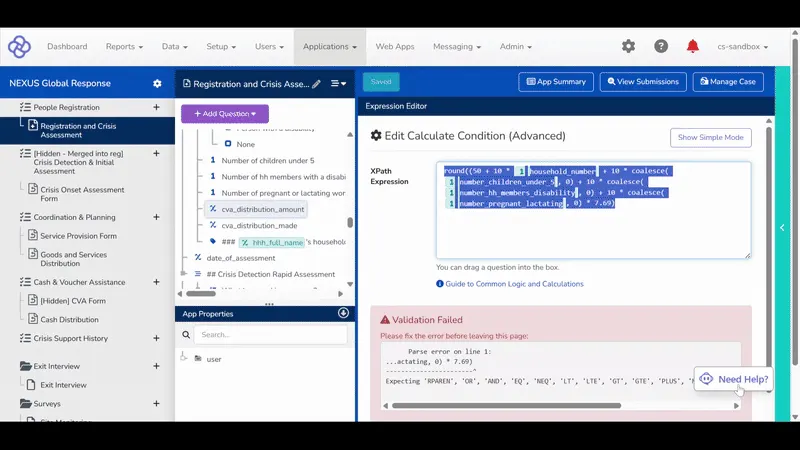
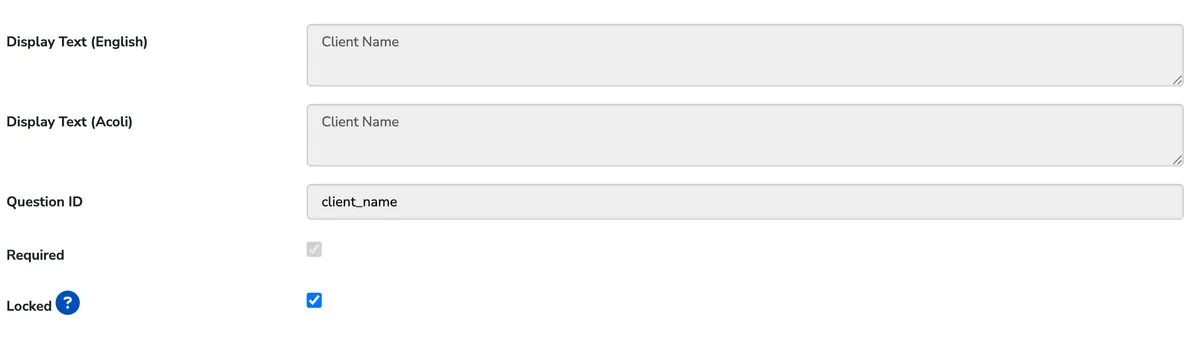
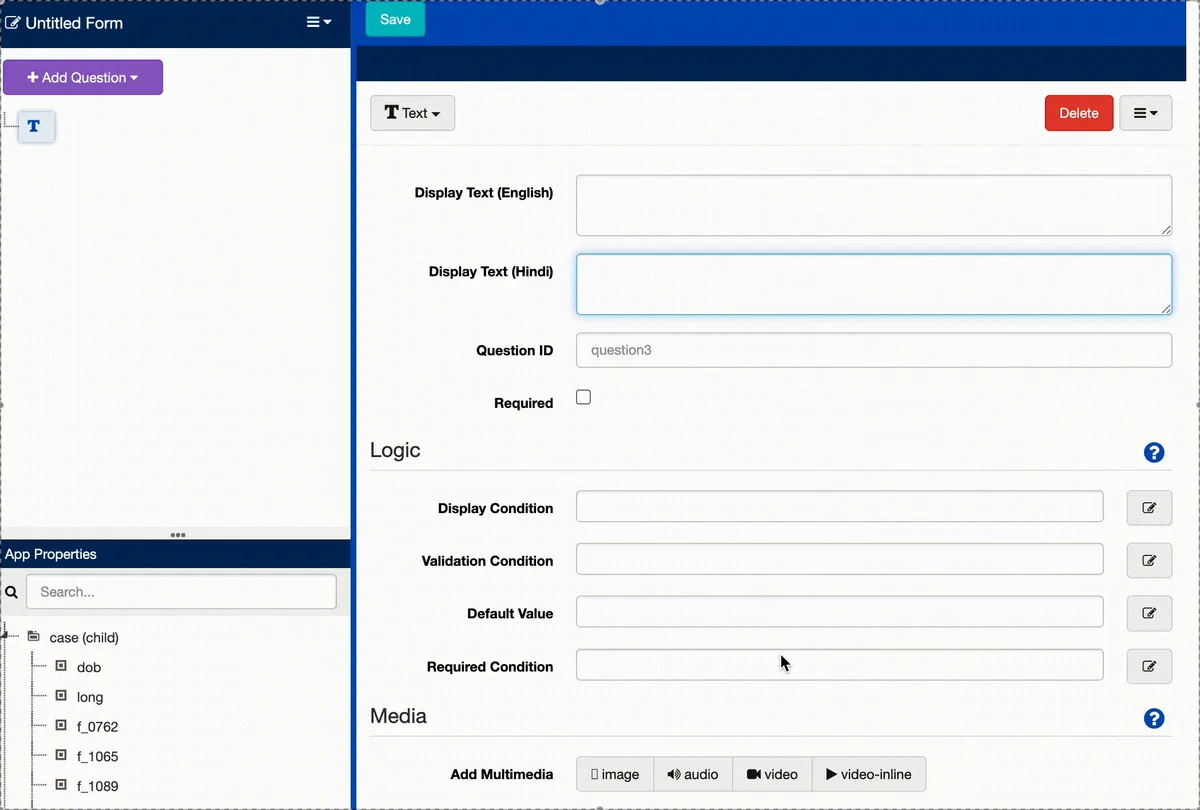
App builders can now lock specific questions and groups in the Form Builder so they cannot be edited, moved, or deleted by users who do not hold the new locked questions permission. This protects critical form logic, structure, and case mappings while still allowing the rest of your team to make everyday edits.

  • Lock any question or group
  • A dedicated permission
  • Protection that holds everywhere
Shipped May 29, 2026

Locked Admin Questions

Screenshot: Locked Admin Questions

App builders can now lock specific questions and groups in the Form Builder so they cannot be edited, moved, or deleted by users who do not hold the new locked questions permission. This protects critical form logic, structure, and case mappings while still allowing the rest of your team to make everyday edits. Read more on the Locked Admin Questions wiki page.

What’s included

  • Lock any question or group: Users with the permission see a Locked setting on every question and group. Locked items can only be edited, moved, or deleted by users with the permission, and for multiple choice questions the choices are locked too.
  • A dedicated permission: A new role permission, "Allow locking and unlocking questions in forms," controls who can lock and unlock. It is available on any role that already has Edit Applications, so you can reserve it for your most trusted builders.
  • Protection that holds everywhere: Case property mappings that reference a locked question cannot be changed, bulk translation uploads skip locked questions, and Edit Source XML and Upload XForm are unavailable to users without the permission on forms that contain locked questions.
  • Group-aware locking: Locking a group applies to everything inside it, and a group containing locked questions cannot be moved, deleted, or have its Question ID changed.

Want to see it in action, or check if it fits your program?

Get in Touch
Screenshot: Advanced Case Actions Now Included in Advanced and Enterprise Plans
CommCare HQMay 6, 2026

Advanced Case Actions Now Included in Advanced and Enterprise Plans

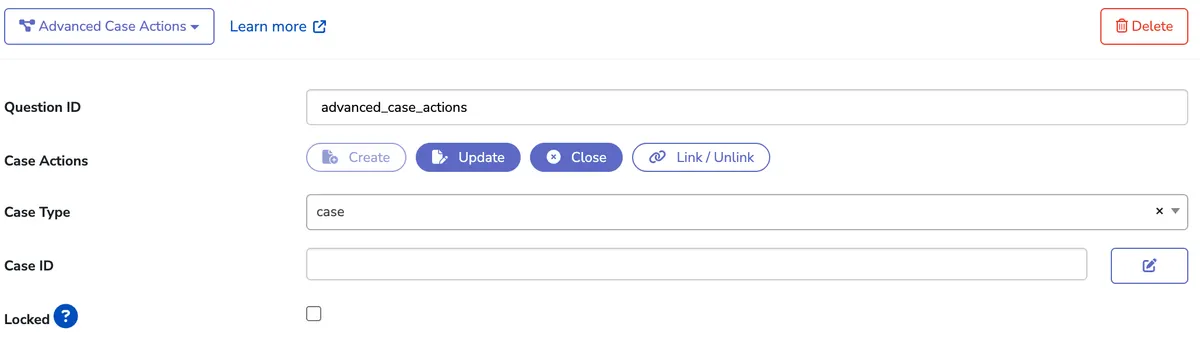
Advanced Case Actions now enables a single form to create, update, index, or close related cases. The capability previously required a feature flag that had to be requested along with a dedicated training session. Alongside this release, we redesigned how case management is configured in the Form Builder.

  • Act on cases your form never loaded
  • Case management where it was never possible before
  • Manage case relationships directly
Shipped May 6, 2026

Advanced Case Actions Now Included in Advanced and Enterprise Plans

Screenshot: Advanced Case Actions Now Included in Advanced and Enterprise Plans

Advanced Case Actions now enables a single form to create, update, index, or close related cases. The capability previously required a feature flag that had to be requested along with a dedicated training session. Alongside this release, we redesigned how case management is configured in the Form Builder. Read more on the Advanced Case Actions wiki page.

What’s included

  • Act on cases your form never loaded: Create, update, close, or link cases of any case type, not just the one tied to the module's case list. A Visit form can register a new Visit case, link it to the Patient, and update the Patient, all in one submission.
  • Case management where it was never possible before: Use cases in Survey forms that have no case list, register one new case per row of a repeat group, or update a case whose ID is computed during form entry, for example from a lookup table.
  • Manage case relationships directly: Link a case to a parent or host case as a child or extension, unlink existing relationships, or even change a case's type, all from inside the form.

Want to see it in action, or check if it fits your program?

Get in Touch
Screenshot: Geospatial: Boundary Overlays on the Map and New Case List Formats
CommCare MobileApr 27, 2026

Geospatial: Boundary Overlays on the Map and New Case List Formats

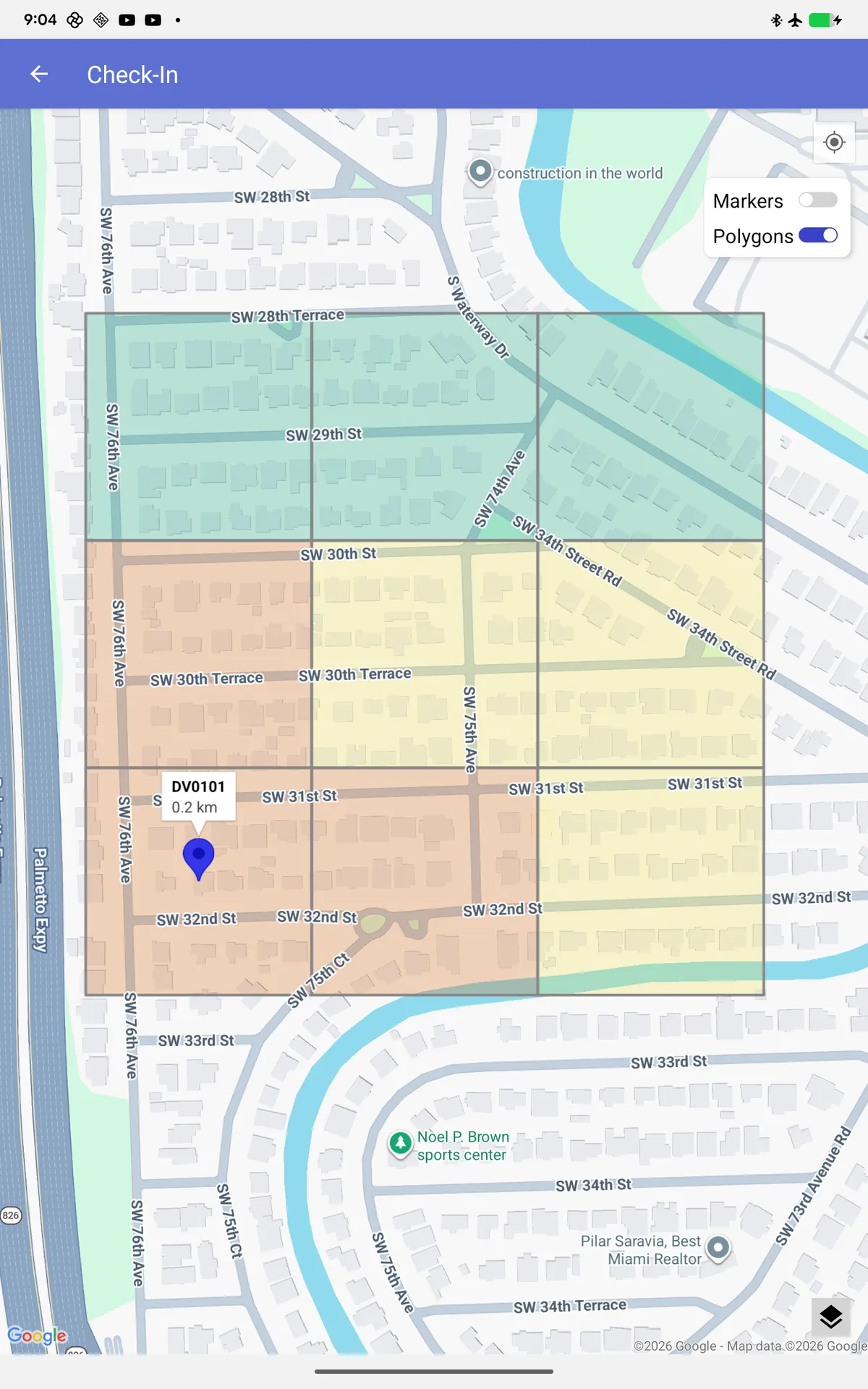
Geospatial projects got a meaningful upgrade this quarter on both mobile and HQ. On CommCare Mobile 2.62, mobile workers can now see administrative boundary overlays directly on case list maps, making it easier to understand where cases sit relative to the geographic areas your program cares about.

  • Boundary overlays on case list maps
  • New Geo Boundary and Geo Points display formats
  • Better GPS accuracy in forms
Shipped Apr 27, 2026

Geospatial: Boundary Overlays on the Map and New Case List Formats

Screenshot: Geospatial: Boundary Overlays on the Map and New Case List Formats

Geospatial projects got a meaningful upgrade this quarter on both mobile and HQ. On CommCare Mobile 2.62, mobile workers can now see administrative boundary overlays directly on case list maps, making it easier to understand where cases sit relative to the geographic areas your program cares about. In HQ, we added four new geo formats to the Case List configuration so projects can display geo boundaries, geo points, and their associated colors directly in the case list. See more here.

What’s included

  • Boundary overlays on case list maps: Mobile workers see administrative boundaries rendered on the map alongside their cases, adding geographic context to every case list view.
  • New Geo Boundary and Geo Points display formats: The Case List configuration now supports Geo Boundary, Geo Boundary Color, Geo Points, and Geo Points Color as display properties, with built-in validation to keep the setup consistent.
  • Better GPS accuracy in forms: CommCare Mobile 2.62 also improves the reliability and accuracy of GPS capture inside forms, so the geo data you collect is cleaner to begin with.

Want to see it in action, or check if it fits your program?

Get in Touch
Other changes in 2026 75

October 2026

  • Oct 22ImprovementAllow self-enabling SMS messagingDetails

    A project space admin can now enable messaging for their own project space, rather than having to contact support to have it enabled via the internal account settings form.

  • Oct 20Mobile releaseCommCare Mobile 2.65Release notes
  • Oct 16ImprovementEnforce mobile worker limit in bulk user uploadDetails

    Bulk user upload no longer lets a project exceed its plan's mobile worker limit when the plan doesn't allow excess users. Previously the limit was only enforced when creating or reactivating a single mobile worker in the UI, so uploading users bypassed it.

  • Oct 14ImprovementWebApps Dense ModeDetails

    Introduces a new Pragma to enable "Dense Mode" for forms:

  • Oct 1HighlightA More Secure CommCare via a Longer Minimum Password Length

    CommCare HQ now requires new passwords to be at least 14 characters long, up from 8.

    CommCare HQAll plans
    Shipped Oct 1, 2026

    A More Secure CommCare via a Longer Minimum Password Length

    Screenshot: A More Secure CommCare via a Longer Minimum Password Length

    CommCare HQ now requires new passwords to be at least 14 characters long, up from 8.

    What’s included

    • Web users: Every new web user password must be at least 14 characters long, including passwords set at sign-up, when accepting a project invitation, and when changing or resetting a password.
    • Mobile workers who set their own password: When a mobile worker sets a password from an emailed account confirmation link or password reset link, the password must be at least 14 characters long.
    • Projects that require strong passwords: In projects that have Require Strong Passwords for Mobile Workers turned on, new mobile worker passwords set in CommCare HQ or in a bulk upload file must be at least 14 characters long, and the passwords CommCare HQ suggests for mobile workers are now 14 characters long.

    Want to see it in action, or check if it fits your program?

    Get in Touch

September 2026

  • Sep 25FixBreak username field in case history tableDetails

    Before (potentially overlapping with form information):

  • Sep 21Smaller updateCopied apps include their lookup tablesDetails

    When you copy an app to another project space, CommCare now also copies the lookup tables the app uses and lists them in the confirmation message.

  • Sep 18Smaller updateArchiving forms that updated existing casesDetails

    A form whose create action updated a case that already existed can now be archived, as long as no later form has changed that case.

  • Sep 9FixRender module settings page when Select Parent First module was deletedDetails

    A case list module that has Select Parent First turned on keeps pointing at the parent case list after that case list is deleted. Opening the child module's settings page then failed with a 500, so the builder could not open the page to fix or turn off the setting.

  • Sep 7ImprovementDisallow annual plan downgrade in backendDetails

    Currently, when a user tries to downgrade from an annual plan, the "Next" button is already disabled, however user can manipulate the DOM to remove the disabled flag of the "Next" button and proceed with the downgrade.

  • Sep 7Mobile releaseCommCare Mobile 2.64.1Release notes
  • Sep 3FixReset Report an issue form after submissionDetails

    The Report an Issue modal retained values from the previous report after it was closed and reopened.

  • Sep 3Smaller updateCopy apps to an upstream project spaceDetails

    You can now copy an app from a linked project space to its upstream project space, which was previously blocked.

  • Sep 3ImprovementRequire view_apps/edit_apps on App Manager viewsDetails

    A web user whose role has neither the Edit Applications nor View Applications permission can currently open any App Manager page (app, module, form, settings, releases) by navigating directly to its URL.

  • Sep 2Smaller updateCorrect longitudes in Web AppsDetails

    GPS questions in Web Apps no longer display or save longitudes over 180 degrees.

  • Sep 1FixDon't Send Emails on $0 Monthly Invoices for Pay Annually SubscriptionsDetails

    Will no longer send monthly invoice emails to customers on Pay Annually subscriptions when that monthly invoice has a $0 balance at generation (e.g. it was fully paid by credits).

  • Sep 1ImprovementOnly Include Downstream Domains with Release Management as LinkableDetails

    Prevents project spaces without the correct privileges from being shown as eligible Linked Project Spaces in MRM/ERM choices.

August 2026

  • Aug 27ImprovementAdd a Cloudflare Turnstile form fieldDetails

    Adds a Cloudflare Turnstile form field that, when keys are correctly set, can be used to verify a user before a form is submitted.

  • Aug 26Smaller updateNew Application button on the dashboardDetails

    The Applications tile on the project dashboard now has a + button that opens the New Application page.

  • Aug 25ImprovementDomain-scoped OAuth followupsDetails

    - Using a domain-scoped OAuth token to access the list_domains endpoint now returns only the domains that token can access, in line with how we handle domain-scoped API keys.

  • Aug 21FixDo not display low credits modal for enterprise customerDetails

    Enterprise customer shouldn't see this low credits alert because their renewals are handled differently, and at an HQ level.

  • Aug 21ImprovementAllow domain-scoping OAuth tokensDetails

    Makes OAuth authorization requests ask for domain scope - allows selection of any number of project spaces but removes the implicit "all domains" access that this page used to apply.

  • Aug 19ImprovementImprove OAuth UI: match HQ stylingDetails

    Replaces the generic OAuth request template with one styled for CommCare

  • Aug 17Mobile releaseCommCare Mobile 2.64Release notes

    CommCare Mobile 2.64 was released in August, followed by a 2.64.1 update in September. Along with the Face Capture question described above, CommCare Mobile 2.64 includes a redesigned audio recorder, a framing guide for photos, and more accurate automatic location capture.

  • Aug 11Mobile releaseCommCare Mobile 2.63.5Release notes
  • Aug 10FixDon't show payloads of soft deleted data in the repeat records reportDetails

    In the Repeat Records report, clicking Payload previews the payload of a repeat record. Until now, if the underlying form or case had been soft deleted, its data was still fetched and shown in the preview modal.

  • Aug 5ImprovementFind payload errors and empty records from the Record Status filterDetails

    There was a bug with the record status filter on the repeat record report. In code, it mentioned that the success and empty states were combined in the UI, as were the payload rejected and error generating payload states.

  • Aug 4ImprovementUpdate CommCare pricing URLsDetails

    Replaces links to the Confluence wiki pricing page and the old CommCare page on dimagi.com with the new CommCare website's pricing page.

July 2026

  • Jul 31ImprovementUpdate pricing link in API docs to official CommCare pricing pageDetails

    This PR updates the pricing link in the documentation to point to the official CommCare pricing page ( instead of the confluence page

  • Jul 27Mobile releaseCommCare Mobile 2.63.4Release notes
  • Jul 27Mobile releaseCommCare Mobile 2.63.3Release notes
  • Jul 14ImprovementAdd Enterprise Dashboard usage metricsDetails

    Adds two new metrics to the feature usage metrics reported in Salesforce. They track whether users have exported a report ("cp_n_enterprise_console_exports"), or changed a setting ("cp_n_enterprise_settings_edits").

  • Jul 13Mobile releaseCommCare Mobile 2.63.2Release notes

June 2026

  • Jun 15Mobile releaseCommCare Mobile 2.63.1Release notes
  • Apr to JunSmaller updateContinued HQ modernization

    The form settings page in App Manager moved to our current UI framework, with cleaner layout and more consistent styling.

May 2026

  • May 30FixFix Select Parent First with custom index identifiersDetails

    "Select Parent First" on a child case's module is supposed to ask the user to pick a parent case, then narrow the child list to that parent's children. Today it only works when the child case is indexed under the reference id parent.

  • May 27ImprovementApp_manager form settings viewDetails

    Migrates the app_manager form view (form_view.html) from Bootstrap 3 to Bootstrap 5. User-facing effect is layout/styling parity with the B3 version — visual changes are intentional B5 equivalents.

  • May 26Smaller updateSSO API access tightenedDetails

    Web users who sign in through SSO now always need an API key for API access.

  • May 20Mobile releaseCommCare Mobile 2.63Release notes

    A new version of CommCare Mobile (2.63) is on the Google Play Store, followed by a 2.63.1 patch release. This release focuses on form entry reliability and stability during case loading. See the 2.63 release notes for the full list.

  • May 15ImprovementUse <button> instead of <a> for print buttonDetails

    Fixes a bug where clicking the Print button in web apps would break breadcrumb navigation. No visual changes.

  • May 15Smaller updateAdd-Ons page polishDetails

    The "Enable All Add-Ons" button in App Settings is now disabled when every add-on is already enabled.

  • May 15FixFix bulk-user API q parameter being silently ignoredDetails

    A fix for the bulk-user api returning all users instead of filtering for valid users when using query string.

  • May 14Smaller updateEdit form details without leaving the Form BuilderDetails

    The Edit Form Details modal now lives inside the Form Builder, and changes to a form's name and comment save together with the rest of the form.

  • May 5ImprovementUpdate error textDetails

    Update user facing text from "Save to Case" to "Advanced Case Actions" since we renamed this feature

April 2026

  • Apr 27Mobile releaseCommCare Mobile 2.62Release notes

    A new version of CommCare Mobile (2.62) is on the Google Play Store. Beyond the geospatial improvements called out above, this release focuses on stability and reliability on newer Android versions, alongside a handful of meaningful bug fixes. See the 2.62 release notes for the full list.

  • Apr 27ImprovementClean up form action diff code and testsDetails

    Improves the user-facing alert shown when a case property mapping is concurrently changed and deleted in separate sessions — the wording is now clearer about what happened.

  • Apr 21Smaller updateSimpler API rate limitingDetails

    The API rate limiter no longer applies a weekly window.

  • Apr 14HighlightCase API v2: Request Only the Fields You Need

    Case API v2 now supports "fields" and "exclude" query parameters, so API consumers can trim responses down to exactly the data they care about. This makes integrations faster and payloads smaller, especially for cases with many properties. The full API reference lives in the CommCare API documentation.

    CommCare HQAll plans
    Shipped Apr 14, 2026

    Case API v2: Request Only the Fields You Need

    Case API v2 now supports "fields" and "exclude" query parameters, so API consumers can trim responses down to exactly the data they care about. This makes integrations faster and payloads smaller, especially for cases with many properties. The full API reference lives in the CommCare API documentation.

    What’s included

    • Pick your fields: Pass a "fields" parameter to receive only the fields you list.
    • Or exclude them: Pass "exclude" to drop fields you do not need from the response.
    • Nested field support: Dot notation reaches inside case properties, for example fields.properties=edd,age.
    • Works across the API: Filtering applies on all GET endpoints and on create and update responses, including paginated requests.

    Want to see it in action, or check if it fits your program?

    Get in Touch
  • Apr 9FixFix UserDomainsResource domain filtering and paginationDetails

    Fixes two bugs in the /api/v0.5/user_domains/ endpoint:

March 2026

  • Mar 24FixHandle percent-encoded patches from Vellum emoji fixDetails

    Forms with emoji fail to save when reordering question lists. This is the server-side companion to the Vellum fix.

  • Mar 23ImprovementRevert part of "Make split-screen case search always enabled in Web Apps"Details

    This reverts parts of commit f4df216e2a42761fd78d9729f8911d18553f5dc9. The search box for searching in case db search should not have been removed The persistent menu should still behave differently when split screen case search is enabled * Use sidebarEnabled instead of…

  • Mar 20Smaller updateLonger mobile worker invite windowDetails

    Email confirmation invites for mobile workers now expire after 72 hours instead of 24, giving field teams more time to confirm their accounts without needing an admin to resend.

  • Mar 16ImprovementRemove ZAPIER_INTEGRATION privilege check in 'user domains' APIDetails

    The user_domains API currently only includes domains that have the 'ZAPIER' privilege. This PR removes that restriction so that the API returns ALL domains the user is a member of.

  • Mar 11Smaller updateAPI key display fixDetails

    A trailing space in the API key display has been removed so keys copy cleanly.

  • Mar 11ImprovementDisallow basic auth for SSO users in API endpointsDetails

    SSO users attempting to use basic authentication on API endpoints now receive a clear, actionable error message directing them to use API key authentication instead.

  • Mar 10ImprovementValidate save to case question when make buildDetails

    Add validation so that if a save to case question want to create a case but doesn't provide case_type and case_name will not be allowed to make new version.

  • Mar 4ImprovementMetrics for usage of advanced app featuresDetails

    This change adds metrics to track usage of advanced app features, so that they are available to Salesforce.

  • Jan to MarHighlightA More Modern CommCare HQ

    We are continuing a long-running effort to modernize the HQ interface under the hood. This quarter, several of the most-used pages in App Manager were migrated to our current UI framework: the Releases page, App Settings, App Summary and a number of smaller screens.

    CommCare HQAll plans
    Shipped January to March 2026

    A More Modern CommCare HQ

    Screenshot: A More Modern CommCare HQ

    We are continuing a long-running effort to modernize the HQ interface under the hood. This quarter, several of the most-used pages in App Manager were migrated to our current UI framework: the Releases page, App Settings, App Summary and a number of smaller screens. You do not need to change anything to benefit, you will just notice cleaner layouts, better spacing, and more consistent styling as you move through HQ.

    What’s included

    • Refreshed App Manager screens: Releases, App Settings, and App Summary all received a visual refresh while keeping every workflow you already know.
    • More consistent styling: Modals, tables, and form controls now line up with the rest of the product, so moving between pages feels less jarring.

    Want to see it in action, or check if it fits your program?

    Get in Touch

February 2026

  • Feb 26ImprovementConditional Alerts : Support for additional messaging recipients for Connect Messaging and SurveysDetails

    Users can now select multiple recipient types when configuring Connect Messages and Connect Surveys, rather than being restricted to only mobile workers. The system validates that selected recipient types are compatible with Connect (i.e., they resolve to CommCareUser…

  • Feb 19ImprovementMove case search workflow settings and related configuration behind new FFsDetails

    Move case search workflow settings and related configuration behind new FFs.

  • Feb 17Mobile releaseCommCare Mobile 2.61.5Release notes
  • Feb 5HighlightEdit Role Now Has Its Own Page

    Configuring roles in CommCare used to happen in a cramped modal that made managing permissions for larger projects tedious. We have now rebuilt the role editor as a full standalone page, giving admins the space to see every permission at once and the breathing room to configure more complex roles without scrolling…

    CommCare HQAll plans
    Shipped Feb 5, 2026

    Edit Role Now Has Its Own Page

    Screenshot: Edit Role Now Has Its Own Page

    Configuring roles in CommCare used to happen in a cramped modal that made managing permissions for larger projects tedious. We have now rebuilt the role editor as a full standalone page, giving admins the space to see every permission at once and the breathing room to configure more complex roles without scrolling inside a tiny window. Read more about roles and permissions here.

    What’s included

    • More room to work: Every permission is visible on a single scrollable page, rather than a modal that forces you to scroll inside a smaller window.
    • Cleaner navigation: Editing a role now opens a dedicated page with its own URL, so you can share a link to a specific role or keep it open in a separate tab while you compare roles.
    • Easier to manage complex setups: Projects with many granular permissions benefit most, since all the toggles and profile restrictions are laid out with clear visual hierarchy.

    Want to see it in action, or check if it fits your program?

    Get in Touch
  • Feb 2ImprovementMore thoroughly validate autopay requirement on subscribing to planDetails

    Adds this error message when subscribing to a plan if an autopay card is required and has not been added - and somehow frontend validation has been bypassed:

January 2026

  • Jan 28Mobile releaseCommCare Mobile 2.61.4Release notes
  • Jan 27Data Export ToolData Export Tool 1.15.0Release notes
  • Jan 26ImprovementMake sure callback is called exactly onceDetails

    Before: As shown in the video: The delete button will have 3 spinners

  • Jan 23Smaller updateForm attachments layout polishDetails

    The form attachments area has a cleaner layout that is easier to scan when a form has many attachments.

  • Jan 22Smaller updateView-only users can download user listsDetails

    Web users and mobile workers with view permission on the user lists can now download the lists, a permission that previously required edit access.

  • Jan 22FixFix tags, remove unusedDetails

    CommCare HQ now uses just 4 feature flag tags:

  • Jan 21FixHandle submit errors better in app previewDetails

    Before: - no overall error notification - 'next error' is always below the submit button and also it does not work - 'submit' spinner never disappears

  • Jan 20ImprovementDET Exports API documentationDetails

    Adds documentation for the new DET Exports API. The API was added for CommCare Data Pipeline, to be able to list the Case and Form Exports available, and to download their config files automatically.

  • Jan 20Mobile releaseCommCare Mobile 2.61.3Release notes
  • Jan 19FixDon't wrap wide table cells in web apps/app previewDetails

    Makes markdown tables with many columns scroll instead of wrap. This does not prevent wrapping of table cells entirely - they will still break at appropriate locations between words. Before:

  • Jan 15ImprovementAdd 4 new geo formats in Case List property config for display propertiesDetails

    - Adds four new formats in the case list config section for display properties. 1. Geo Boundary (requires Address) 2. Geo Boundary Color (requires Geo Boundary) 3. Geo Points (requires Address) 4.

  • Jan 9HighlightCommCare Data Export Tool 1.14.0

    A new version of the CommCare Data Export Tool is out. Version 1.14.0 focuses on performance and observability: CSV exports now use significantly less RAM, which means they run faster on large projects and are far less likely to hit memory limits.

    Data Export ToolAll plans
    Shipped Jan 9, 2026

    CommCare Data Export Tool 1.14.0

    A new version of the CommCare Data Export Tool is out. Version 1.14.0 focuses on performance and observability: CSV exports now use significantly less RAM, which means they run faster on large projects and are far less likely to hit memory limits. We also improved logging so it is easier to diagnose what happened if an export does not behave as expected. Release notes for all versions live on the commcare-export GitHub releases page.

    What’s included

    • Faster CSV exports: Reduced RAM usage means exports run faster and scale better to large data sets.
    • Improved logging: Clearer diagnostic information when exports need troubleshooting.
    • Updated API documentation: The DET Exports API docs were updated alongside this release to make it easier for new users to get set up.

    Want to see it in action, or check if it fits your program?

    Get in Touch
Last year

2025: A year of doing more with less

Teams faced shrinking budgets and growing needs, so we built CommCare around what they needed most: faster and easier ways to get work done.

Screenshot: Global Hosting Options are HereBig release
CommCare HQJuly to September 2025

Global Hosting Options are Here

Starting now, new CommCare projects can be hosted in three secure regions: the EU (Ireland), India (Mumbai), or the US (Virginia). This flexibility supports internal policies, funder conditions, or team data preferences, all at the same price and features.

  • Identical functionality
  • Enterprise-grade security
  • Simple setup
CommCare HQBig releaseAll plans
Shipped July to September 2025

Global Hosting Options are Here

Screenshot: Global Hosting Options are Here

Starting now, new CommCare projects can be hosted in three secure regions: the EU (Ireland), India (Mumbai), or the US (Virginia). This flexibility supports internal policies, funder conditions, or team data preferences, all at the same price and features.

This expansion is crucial for organizations needing EU data hosting. Key highlights include:

Existing project data cannot be migrated between cloud locations, but project metadata can be migrated by following the instructions here.

Read more about CommCare's cloud hosting locations here!

What’s included

  • Identical functionality: Mobile and web apps, offline capability, integrations, and support are consistent across regions.
  • Enterprise-grade security: All locations use SOC 2-certified AWS infrastructure, ensuring full GDPR and HIPAA compliance with end-to-end encryption.
  • Simple setup: New users can sign up for an EU or India account in minutes.

Want to see it in action, or check if it fits your program?

Get in Touch
Screenshot: Meet the CommCare Companion: Your AI-Powered Assistant!Big release
CommCare HQJuly to September 2025

Meet the CommCare Companion: Your AI-Powered Assistant!

We are excited to introduce the CommCare Companion, an AI-powered chatbot designed to assist you directly within CommCare HQ. Whether you need help building an app, managing cases, or troubleshooting an error, the Companion provides real-time guidance and answers to help you work more efficiently.

  • Instant Guidance
  • Step-by-Step Help
  • Troubleshoot Errors
CommCare HQBig releaseAll plans
Shipped July to September 2025

Meet the CommCare Companion: Your AI-Powered Assistant!

Screenshot: Meet the CommCare Companion: Your AI-Powered Assistant!

We are excited to introduce the CommCare Companion, an AI-powered chatbot designed to assist you directly within CommCare HQ. Whether you need help building an app, managing cases, or troubleshooting an error, the Companion provides real-time guidance and answers to help you work more efficiently.

The highlights of this new tool are:

You can enable the CommCare Companion by opting into the beta via these directions. As this feature is in beta, your feedback is invaluable. Please share any thoughts or suggestions with us at support@dimagi.com.

What’s included

  • Instant Guidance: Get real-time answers to your questions about app building, data collection, case management, and more without leaving the page you are on.
  • Step-by-Step Help: Ask for guidance on specific tasks, like "How do I create a new case?" or "Can you walk me through the form builder?"
  • Troubleshoot Errors: Paste an error message into the chat and the Companion can provide guidance on how to resolve the issue.

Want to see it in action, or check if it fits your program?

Get in Touch
Screenshot: Bulk Case Data Editing is HereBig release
CommCare HQApril to June 2025

Bulk Case Data Editing is Here

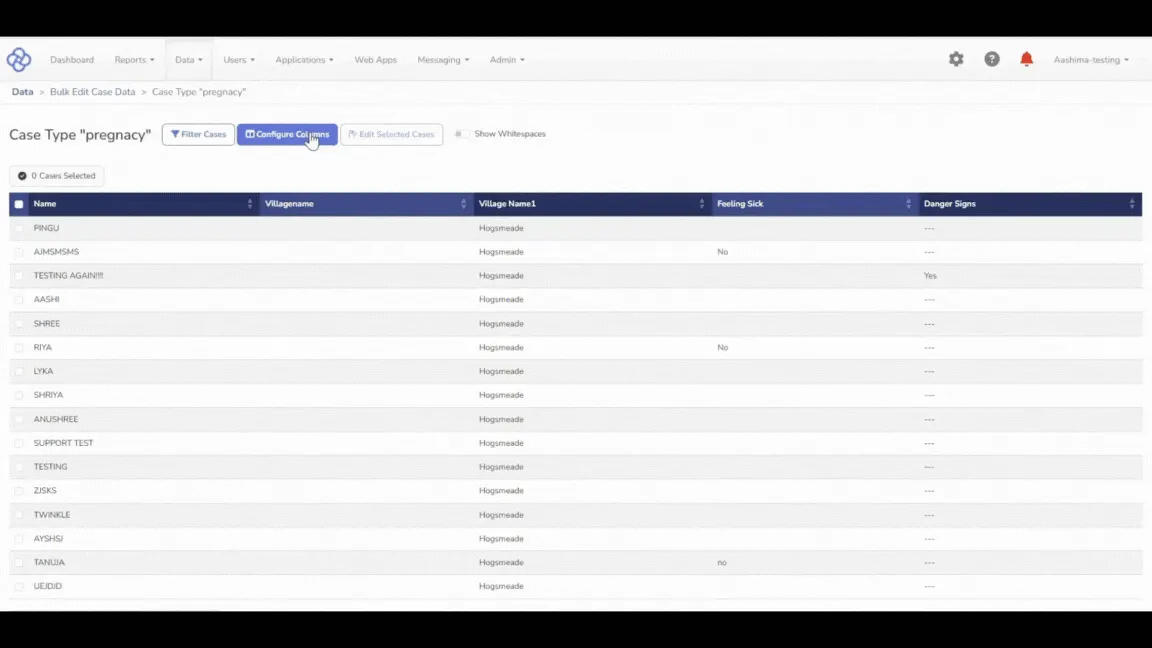
In May, we released our first ever bulk in-product data editing tool for cases! This tool allows you to make bulk case data editing without having to export cases then re-import them! This takes Excel files out of the equation, and provides a beautiful new interface to perform one update or thousands.

  • The ability to filter, sort, and review cases in a table view, applying batch updates directly within the platform.
  • The ability to perform actions such as replacing values, stripping white spaces, and formatting text, with a preview option before applying changes.
  • Easy in-line editing for quick updates by double-clicking editable cells, and multiple actions can be performed in a single session.
CommCare HQBig releaseAdvanced plan and above
Shipped April to June 2025

Bulk Case Data Editing is Here

Screenshot: Bulk Case Data Editing is Here

In May, we released our first ever bulk in-product data editing tool for cases! This tool allows you to make bulk case data editing without having to export cases then re-import them! This takes Excel files out of the equation, and provides a beautiful new interface to perform one update or thousands. The highlights of this tool are:

Read more about it here!

What’s included

  • The ability to filter, sort, and review cases in a table view, applying batch updates directly within the platform.
  • The ability to perform actions such as replacing values, stripping white spaces, and formatting text, with a preview option before applying changes.
  • Easy in-line editing for quick updates by double-clicking editable cells, and multiple actions can be performed in a single session.
  • Multiple data editing actions including Replace, Find and Replace, Copy and Replace, and formatting options like Make Title Case, Upper Case, and Lower Case.

Want to see it in action, or check if it fits your program?

Get in Touch
Screenshot: A More User-Friendly, Intuitive CommCare HQBig release
CommCare HQApril to June 2025

A More User-Friendly, Intuitive CommCare HQ

We've made a number of improvements to CommCare HQ, ranging from the Form Builder, to the Report Builder, and Case Management. See more about each below!

  • All filters for reports now contain all users, not just mobile users.
  • Key reports now have hover text to help users understand the purpose of each report.
  • The "Submit History" report is now "Submission History"
CommCare HQBig releaseAll plans
Shipped April to June 2025

A More User-Friendly, Intuitive CommCare HQ

Screenshot: A More User-Friendly, Intuitive CommCare HQ

We've made a number of improvements to CommCare HQ, ranging from the Form Builder, to the Report Builder, and Case Management. See more about each below!

We've made updates to make finding data in reports more intuitive, including:

We've made a suite of updates to the form builder to make it easier to build apps, especially for first time users! These are a few of our favorite highlights:

What’s included

  • All filters for reports now contain all users, not just mobile users.
  • Key reports now have hover text to help users understand the purpose of each report.
  • The "Submit History" report is now "Submission History"
  • The "Application Status Report" is now "User Last Activity" report
  • The "User(s)" filter is now "Submitted By" in the Submission History report.
  • "Drag and drop" on the Form Builder is more intuitive with a helpful highlight showing users where items can be dropped.
  • A new button now takes you straight to the Submission History report. No more navigating to the "Reports" page to find your data!
  • The "Add Question" button has been improved to be more intuitive and action-oriented.
  • A new modal now allows you to define your case type before creating a case list menu, stopping users from accidentally creating the wrong case type!

Want to see it in action, or check if it fits your program?

Get in Touch
Big release
CommCare HQApr 21, 2025

A Newly Affordable Standard Plan

In April, we released an update to our Standard Plan to reduce the price from $250 to $100 USD per month paid annually. We believe that cost shouldn't limit our partners from being able to run impactful, digitally enabled programs around the world.

CommCare HQBig releaseStandard plan and above
Shipped Apr 21, 2025

A Newly Affordable Standard Plan

In April, we released an update to our Standard Plan to reduce the price from $250 to $100 USD per month paid annually. We believe that cost shouldn't limit our partners from being able to run impactful, digitally enabled programs around the world. With this update, our partners can access the necessary core features to get started on CommCare at an affordable price.

Read more about it here, and view our webinar here!

Want to see it in action, or check if it fits your program?

Get in Touch
Other changes in 2025 154

December 2025

  • Dec 18ImprovementAdd autopay_card to enterprise billing statements viewDetails

    Fixes a bug where autopay card appears as undefined on the enterprise billing statements page, whether there is an autopay card set or not:

  • Dec 18ImprovementDisable Cancel and Subscribe to Plan buttons on submitDetails

    Disables Cancel and Subscribe to Plan buttons on submit when confirming signup for a new subscription:

  • Dec 18ImprovementRemove unused case tile templatesDetails

    Remove unused case tile templates. We want users to use the manually configured case tiles. Remove all templates that are not used by a production app.

  • Dec 17ImprovementShow next autopay date on Current Subscription pageDetails

    Adds text showing the customer their next scheduled autopay date, when autopay is enabled and there is an invoice due in the future:

  • Dec 17FixFix bug with one-time bulk payment via StripeDetails

    Fixes two related bugs where users could not make a bulk payment on the Billing Statements page with an unsaved card: - when the customer had no saved cards, they would see a "Your card number is incorrect" error - when the customer had any saved cards, they would see…

  • Dec 11HighlightGranular Permissions: Control Which Profiles Can Be Assigned

    We are enhancing role-based access control by introducing the ability to limit which user profiles a web user can assign to others. Previously, any user with permission to edit users could assign any profile.

    Shipped Dec 11, 2025

    Granular Permissions: Control Which Profiles Can Be Assigned

    Screenshot: Granular Permissions: Control Which Profiles Can Be Assigned

    We are enhancing role-based access control by introducing the ability to limit which user profiles a web user can assign to others. Previously, any user with permission to edit users could assign any profile. Now, you can restrict specific roles to only assign a designated set of profiles, ensuring tighter security and more precise delegation. See more about roles and permissions here.

    What’s included

    • Precise Delegation: Admins can now configure roles to "Assign Specific User Profiles," restricting which profiles that role is allowed to distribute.
    • Enhanced Security: By limiting profile assignment, you prevent sub-admins from inadvertently granting higher-level permissions or incorrect roles to new users.
    • Flexible Configuration: Roles default to "Assign All User Profiles" to maintain existing workflows, but can be easily toggled to restrict access as needed.

    Want to see it in action, or check if it fits your program?

    Get in Touch
  • Dec 9ImprovementAutopay Updates: Require Autopay for Monthly Customers and Improve NotificationsDetails

    - Requires customers subscribing to Pay Monthly subscriptions to add an autopay method. - Updates the "invoice reminder" notification to 1 day before the due date and includes information about autopay, if applicable.

  • Dec 9ImprovementUpdate ToS versionDetails

    Non-superusers will see the ToS modal once and must click "I agree" to continue using CommCare HQ. This can appear on either a Bootstrap 3 or Bootstrap 5 page with slightly different appearances.

  • Dec 9ImprovementAdd Autopay Terms to HQDetails

    Collapsed, billing information page:

  • Dec 9ImprovementRelease auto-renewal featureDetails

    Makes auto-renewal feature generally available and allows it to be set as the default for user-created subscriptions with end dates. Removes an older subscription reminder email that is replaced by newer auto-renew emails.

  • Dec 5Mobile releaseCommCare Mobile 2.61.2Release notes
  • Dec 4Mobile releaseCommCare Mobile 2.61.1Release notes
  • Dec 4Mobile releaseCommCare Mobile 2.61Release notes
  • Dec 3ImprovementGA Location Columns In App Status ReportDetails

    Release Location Columns In App Status Report feature flag as GA (generally available) to advance and up. Improvements were made to the feature in to get it ready for GA.

  • Dec 2ImprovementAdd "Choose Cloud" step to signup workflowDetails

    Removes the current Cloud Location dropdown in the "Create Account" form fields. Adds a "Choose Cloud" step before entering user information in signup. When a location different from the current one is selected, it will navigate directly to the "Create Account" step in that…

  • Oct to DecHighlightCommCare Mobile Updates: UI Enhancements and Android Support

    We have released a new version of CommCare Mobile on the Google Play Store: 2.60.0. This update focuses on modernizing the app interface for the latest devices, improving update reliability, and ensuring greater stability for mobile workers.

    CommCare HQAll plans
    Shipped October to December 2025

    CommCare Mobile Updates: UI Enhancements and Android Support

    We have released a new version of CommCare Mobile on the Google Play Store: 2.60.0. This update focuses on modernizing the app interface for the latest devices, improving update reliability, and ensuring greater stability for mobile workers.

    See the full list of changes here.

    What’s included

    • Modernized UI for Android 15: Users on Android 15 devices will now see a refreshed edge-to-edge UI on key screens. Content now extends behind the system bars, providing a cleaner and more modern experience aligned with the latest Android standards.
    • Enhanced Forced Updates: We've upgraded the Forced Update feature to support triggering during active user sessions. This ensures critical updates can be pushed more reliably without waiting for users to log out and back in.
    • Improved Stability: To prevent download issues caused by screen rotation, the app is now locked to portrait orientation during downloads. This change ensures stable downloads and prevents errors during data syncing.
    • Updated Android Support: To ensure the highest security and performance standards, we have dropped support for Android 5.0 and 5.1 devices. The minimum supported Android version for CommCare Mobile is now 6.0.

    Want to see it in action, or check if it fits your program?

    Get in Touch
  • Oct to DecHighlightEnhanced Web User Invites: Set Custom Fields During Setup

    We are excited to release a significant improvement to the web user invitation workflow. Previously, inviting a user only allowed you to select a profile. Now, the invite page offers the same flexibility as the "Edit User" page, allowing you to define individual user fields and permissions directly during the…

    Shipped October to December 2025

    Enhanced Web User Invites: Set Custom Fields During Setup

    Screenshot: Enhanced Web User Invites: Set Custom Fields During Setup

    We are excited to release a significant improvement to the web user invitation workflow. Previously, inviting a user only allowed you to select a profile. Now, the invite page offers the same flexibility as the "Edit User" page, allowing you to define individual user fields and permissions directly during the invitation process. This update streamlines onboarding by allowing admins to fully configure user details in a single step.

    Note the new "Additional Information" section

    What’s included

    • Streamlined Workflow: Admins can now manage profiles and custom data in one unified view. This reduces the need to create highly specific profiles for every variation of user permissions.
    • Improved Interface: To keep the invite page clean and easy to navigate, we have moved the Profile selection to its own dedicated section and made the "Additional Information" and "Unrecognized Information" sections collapsible.

    Want to see it in action, or check if it fits your program?

    Get in Touch
  • Oct to DecHighlightData Dictionary: Enforce Data Types on Import

    We are introducing a powerful new way to ensure your project data remains high-quality and standardized. You can now define specific data types for your case properties directly in the Data Dictionary, enforcing validation rules whenever cases are imported.

    Shipped October to December 2025

    Data Dictionary: Enforce Data Types on Import

    Screenshot: Data Dictionary: Enforce Data Types on Import

    We are introducing a powerful new way to ensure your project data remains high-quality and standardized. You can now define specific data types for your case properties directly in the Data Dictionary, enforcing validation rules whenever cases are imported. This ensures that external data matches the strict formats you expect in your application. Read more about it here!

    What’s included

    • Enforce Data Standards: Set properties to require specific formats (such as Dates, GPS coordinates, Phone Numbers, or restricted Multiple Choice options) to keep your data clean.
    • Prevent Bad Imports: If an imported row does not meet the validation criteria defined in the Data Dictionary, the entire row will fail, preventing invalid data from corrupting your project.
    • Clear Error Reporting: You can easily view and toggle affected rows during an import to see exactly which data failed and why, allowing for quick troubleshooting.
    • API Compatibility: These validation rules are also fully respected by the Bulk Upload Case Data API.

    Want to see it in action, or check if it fits your program?

    Get in Touch
  • Oct to DecHighlightGeoJSON Export for Case Data

    We have expanded our data export capabilities to support GeoJSON, making it easier than ever to integrate CommCare data with GIS systems like ArcGIS. This new export format allows you to extract case data along with its geolocation properties in a standardized file format, streamlining geospatial analysis and mapping.

    Shipped October to December 2025

    GeoJSON Export for Case Data

    Screenshot: GeoJSON Export for Case Data

    We have expanded our data export capabilities to support GeoJSON, making it easier than ever to integrate CommCare data with GIS systems like ArcGIS. This new export format allows you to extract case data along with its geolocation properties in a standardized file format, streamlining geospatial analysis and mapping. See more here!

    What’s included

    • Seamless Integration: Export case data directly as a GeoJSON file to easily upload and visualize in third-party GIS tools.
    • Simple Configuration: Easily designate which case property contains the geolocation data (GPS coordinates) during the export setup, ensuring your maps are accurate.
    • Flexible Data Entry: Support for GPS coordinates collected via form submissions, API, or the Case Importer, formatted as "latitude longitude".
    • Validation Support: To ensure data integrity, this feature works in tandem with Data Dictionary validations, confirming that your GPS data follows the correct format.

    Want to see it in action, or check if it fits your program?

    Get in Touch
  • Oct to DecHighlightUpdates to Billing, Renewals, and Terms of Service

    We updated our Terms of Service to streamline operations and ensure a smoother billing experience for all customers. Beginning December 11, 2025, new and renewing subscriptions began following an updated renewal process designed to prevent service interruptions and simplify payment management.

    CommCare HQAll plans
    Shipped October to December 2025

    Updates to Billing, Renewals, and Terms of Service

    We updated our Terms of Service to streamline operations and ensure a smoother billing experience for all customers. Beginning December 11, 2025, new and renewing subscriptions began following an updated renewal process designed to prevent service interruptions and simplify payment management. All the relevant updates can be found in our updated Terms of Service.

    Key updates include:

    What’s included

    • Simplified Monthly Billing: To ensure uninterrupted access to project spaces, we introduced a requirement for all Monthly customers to set up Autopay using a debit or credit card. This automatic payment covers monthly plan fees as well as any on-demand charges (such as excess users or SMS), ensuring invoices are always paid on time.
    • Seamless Auto-Renewals: We enabled auto-renewal by default for all new and renewed subscriptions. This helps prevent accidental service pauses at the end of a contract term. However, you remain in full control and can disable auto-renewal at any time through your subscription settings.

    Want to see it in action, or check if it fits your program?

    Get in Touch

November 2025

  • Nov 20ImprovementCustom Icon Badges: Update documentation linkDetails

    Update the help link for custom icon badges to the new public link,

  • Nov 19HighlightCustom Icon Badges: Instant Insights on Your Case List

    We are excited to introduce Custom Icon Badges, a new feature that brings high-level insights directly to your application's home screen. Now, mobile workers can view critical data, such as the number of active cases or pending reviews, right on the module or form icon before they even open it.

    CommCare HQAll plans
    Shipped Nov 19, 2025

    Custom Icon Badges: Instant Insights on Your Case List

    Screenshot: Custom Icon Badges: Instant Insights on Your Case List

    We are excited to introduce Custom Icon Badges, a new feature that brings high-level insights directly to your application's home screen. Now, mobile workers can view critical data, such as the number of active cases or pending reviews, right on the module or form icon before they even open it. This update is designed to help users manage their workload more efficiently by providing a quick snapshot of their program's status. See more here!

    What’s included

    • At-a-Glance Information: Display the total number of cases, enrollment limits, or other relevant data points directly on the app menu.
    • Dynamic Calculations: You can configure badges using XPath functions to show real-time calculated values, such as the count of items awaiting review.

    Want to see it in action, or check if it fits your program?

    Get in Touch
  • Nov 19ImprovementSave case list column config on child case menusDetails

    At present, case lists in web apps will only save the column configuration if the path to get to the case list doesn't involve selecting another case first (this is a bug). This change makes child case lists save the config too

  • Nov 10ImprovementCatch v2 Case API error where property is set twiceDetails

    Addresses a likely cause of

  • Nov 6ImprovementChat widget upgradeDetails

    Upgrade the OCS chat widget:

  • Nov 5ImprovementRaise proper validation error in CSQL fnDetails

    Catch validation in CSQL parsing (case search and/or case list explorer)

  • Nov 4ImprovementCheck pending invitations before deleting profileDetails

    Prevents users from deleting a profile that is assigned to an open invitation, just as they are prevented from deleting a profile assigned to an active user.

  • Nov 4ImprovementRevert "Revert 37023+37086"Details

    Move the profile field to its own section to make it more obvious that it is not just one of the other user fields Make the "Additional Information" and "Unrecognized Information" sections collapsible * Fix "Unrecognizable Information" section on user invites was not showing up…

October 2025

  • Oct 30ImprovementAutopay Customer InvoicesDetails

    Allows Customer Invoices (for "customer billing" accounts) to be autopaid. There's no user-facing (customer or accounting admin) indication this wouldn't work, so likely it was just never implemented.

  • Oct 29ImprovementTemporarily allow removing autopay method on monthly subscriptionsDetails

    We received feedback from ops to hold off on fully requiring autopay for monthly accounts until we update our terms. This softly rolls back that change for an easy revert when the terms are ready.

  • Oct 28ImprovementSet custom-data-fieldset on parent divDetails

    In a recent PR I moved the profile field to its own FieldSet. That meant that custom-data-fieldset was not set on an ancestor node of the fields anymore breaking the knockout bindings.

  • Oct 28ImprovementPayment modal updates: allow payments with autopay card on file for accountDetails

    Adds the ability to pay with the autopay card on file for the account in payment modals (even when current user does not own the card).

  • Oct 24Mobile releaseCommCare Mobile 2.60Release notes
  • Oct 22ImprovementRequire Autopay for new monthly subscriptions on signupDetails

    This PR updates the confirm billing info step (3rd step) when signing up for a new subscription: - Most crucial billing information fields are now required in order to subscribe: first_name, last_name, first_line (of address), city, postal_code, country.

  • Oct 15FixFix error in DomainGlobalSettingsForm when no privilege for enable_all_add_ons is availableDetails

    The project settings form is currently raising a 500 because the form is trying to render a field (enable_all_add_ons) when it was deleted due to a lack of privileges.

  • Oct 13ImprovementAdd autopay card status on Current Subscription pageDetails

    This adds the status of whether autopay is "enabled" or "not set", with a Manage link after linking to the Billing Information page where folks can manage the autopay method.

  • Oct 13FixPrevent Sliding Animation on Initial slideVisible Element LoadDetails

    There was a bug where elements that use data-binding slideVisible show the sliding animation upon page load or element creation.

  • Oct 8ImprovementAutopay UI updates to Billing Information PageDetails

    This adds a new section called "Account Autopay Card" to the Billing Information page, which shows the current autopay for the account (or an alert if none selected), regardless of the owner of the autopay card.

  • Oct 8ImprovementIncrease expiration time for mobile worker email invites to 24 hoursDetails

    Mobile worker email invites will expire after 24 hours, rather than 1 hour.

  • Oct 6FixFix invitation location updates for new web users from bulk uploadDetails

    When bulk uploading web users, locations get removed from invites for new web users when the upload does not contain location column(s). In such a case, instead, no updates are expected for the location information on the invites. This PR fixes that bug.

September 2025

  • Sep 30ImprovementUpdate Dimagi addressDetails

    Mostly applies in emails; anywhere the address is used it has been updated.

  • Sep 29ImprovementRepeat Group Delete Bug FixDetails

    There was a bug where clicking on a repeat group's "delete" button would trigger the group's collapse/uncollapse, and then it would delete the group. This resulted in a weird UI behavior. This PR fixes that bug so that the group does not collapse/uncollapse upon deletion.

  • Sep 28Improvement"Help Modal" Overlay FixDetails

    This PR fixes a bug where the help message is blocked by the navigation menu on web apps.

  • Sep 24ImprovementAdd web help link and fix mobile help link for bulk user managementDetails

    Just a minor change to fix the help link for web user bulk download/upload which was originally pointing to the one for mobile users and then also update the one for mobile users so it goes to the intended hyperlink on the page.

  • Sep 23ImprovementForm question required asterik wrapping fixDetails

    There was a bug where if markdown is used for a question display text, it would result in the required asterik being displayed on the next line instead of inline.

  • Sep 19ImprovementRemove usercase enabled usageDetails

    The core change (replaced usercase_enabled flag checks with privileges.USERCASE) does not have user facing effects.

  • Sep 19Mobile releaseCommCare Mobile 2.59.3Release notes
  • Sep 17FixReset usercase location data when no locationsDetails

    A bug fix to clean up location data on user case when a user is removed from all locations with no assigned locations and no primary location.

  • Sep 15HighlightAPI Update: Use API Keys with Basic Authentication

    We've simplified and standardized the authentication process for all CommCare APIs. We're happy to announce that now all CommCare APIs support using your API key as the password when authenticating via Basic Auth.

    Shipped Sep 15, 2025

    API Update: Use API Keys with Basic Authentication

    We've simplified and standardized the authentication process for all CommCare APIs. We're happy to announce that now all CommCare APIs support using your API key as the password when authenticating via Basic Auth.

    Read more about it here!

    What’s included

    • Simplified Authentication: You can now use your API key directly in the password field for Basic Authentication ( Username + API Key ) across all CommCare APIs, making it easier to set up integrations.
    • Platform-Wide Consistency: This change aligns all APIs under a single, consistent authentication model, removing the need to handle different methods for different endpoints.
    • Full Backwards Compatibility: Existing integrations are not affected. Authentication using a username and password, or using the custom Authorization: ApiKey header, will continue to work without any changes.

    Want to see it in action, or check if it fits your program?

    Get in Touch
  • Sep 15ImprovementAllow commcare-user Case Type for Case ListDetails

    This change allows commcare-user to be defined as the case type. When it is used, a warning message is displayed that notifies the user that it is a reserved case type and refers the user to the docs.

  • Sep 11ImprovementEnable usercase on upgradeDetails

    Enable usercase automatically on upgrade

  • Sep 10Mobile releaseCommCare Mobile 2.59.2Release notes
  • Sep 9ImprovementTweak deletion messaging for data dictionary case propertiesDetails

    The previous wording asked a user if they wanted to "mark this case property as deleted", suggesting it was a status, similar to deprecation. Because deleting a case property entirely removes the property from the data dictionary's knowledge, I updated the wording to try to…

  • Sep 8ImprovementMove Data Sharing setting to Project Information > BasicDetails

    Before: In Project Settings > Internal Data ( Dimagi Only ) > Project Information This is default to "Yes"

  • Sep 8ImprovementGAing FFsDetails

    GAing two feature flags: * EMWF_WORKER_ACTIVITY_REPORT * WEB_USERS_IN_REPORTS

  • Sep 5ImprovementAdd loading spinners for data dictionaryDetails

    Adds a loading spinner for the main content of the Data Dictionary when loading the page:

  • Sep 4FixFixed project data export filter to correctly exclude web usersDetails

    When performing exports, the Project Data filter was not performing as documented. According to the documentation, Project Data, by default, should exclude Web Users. Instead, specifying only the Project Data filter would display Web User cases.

  • Sep 3ImprovementUpdate username taken error message and Add Project page wordingDetails

    Updates the error shown when a username is already taken Before:

  • Sep 3FixFix DateRange Picker display issueDetails

    The Date Range filter in report is offset by an extra day for users in a timezone behind UTC. For example: 1) when checking the worker activity report on April 16th, we expect the default range to be April 9th-16th. Instead we see April 8th-15th.

  • Sep 3ImprovementAdd web user emails to EmailForm contextDetails

    This change allows users to select the email addresses of web users when emailing a report.

  • Sep 3ImprovementSort the User Case Property Selection OptionsDetails

    The User Case Property is now sorted in alphabetical order.

  • Sep 2ImprovementChange email for requesting access to messaging featuresDetails

    Simply change the requests for access to messaging feature to be received on email address configured for accounts instead of sales.

  • Sep 2Mobile releaseCommCare Mobile 2.59.1Release notes
  • Jul to SepHighlightA Modern Makeover for Web Apps and App Preview

    Following the major UI update to CommCare Mobile, we're excited to bring the same modern look and feel to Web Apps and the App Preview feature. This visual refresh aligns these platforms with Dimagi's updated brand, creating a more cohesive and intuitive experience for all users.

    CommCare HQEnterprise plan
    Shipped July to September 2025

    A Modern Makeover for Web Apps and App Preview

    Screenshot: A Modern Makeover for Web Apps and App Preview

    Following the major UI update to CommCare Mobile, we're excited to bring the same modern look and feel to Web Apps and the App Preview feature. This visual refresh aligns these platforms with Dimagi's updated brand, creating a more cohesive and intuitive experience for all users.

    See the changes live in your project space now!

    Want to see it in action, or check if it fits your program?

    Get in Touch
  • Jul to SepHighlightEmpower Mobile Workers with Secure Self-Service Account Setup

    We're excited to release a powerful security enhancement for user management. For mobile workers with an email address, project admins can now trigger a password setup link directly from the user's profile.

    CommCare HQAll plans
    Shipped July to September 2025

    Empower Mobile Workers with Secure Self-Service Account Setup

    We're excited to release a powerful security enhancement for user management. For mobile workers with an email address, project admins can now trigger a password setup link directly from the user's profile. This allows the mobile worker to create their own password, removing the need for admins to manually create or handle user credentials.

    This is also fully programmable via our APIs.

    Read more about it here!

    What’s included

    • Enhanced Security: Admins can now onboard mobile workers without ever knowing or managing their passwords, significantly improving your project's security posture.
    • User Ownership: Once a mobile worker sets their own password via the email link, the ability for an admin to reset it manually is permanently disabled. From then on, only the worker can manage their password through the "Forgot your password?" process.
    • Simple Admin Setup: To start the process, an admin simply navigates to the mobile worker's profile and clicks "Send Password Reset Link" under the Security tab.

    Want to see it in action, or check if it fits your program?

    Get in Touch
  • Jul to SepHighlightNew Flexibility: Temporarily Deactivate and Reactivate Web Users

    We've made managing web user access much more flexible. Previously, if you needed to temporarily remove a user's access, you had to delete their account and manually re-add them later, losing all their settings.

    CommCare HQAll plans
    Shipped July to September 2025

    New Flexibility: Temporarily Deactivate and Reactivate Web Users

    We've made managing web user access much more flexible. Previously, if you needed to temporarily remove a user's access, you had to delete their account and manually re-add them later, losing all their settings. Now, you can simply deactivate them, temporarily revoking their access while preserving their entire configuration for easy reactivation in the future.

    Available programmatically via our APIs here.

    Read more about it here!

    What’s included

    • Seamless Reactivation: Deactivating a user preserves their profile, role, and location assignments. When you're ready, simply click "Reactivate," and their access is restored with all previous settings intact. Billing and Communication Control: A deactivated user cannot log into the domain, will not receive broadcasts or scheduled reports, and is not counted towards your web user count for billing purposes (if deactivated across all project spaces in the billing account).
    • Updated UI and Reporting: The Web Users page now includes a toggle to view and manage your list of deactivated users. Reports have also been updated to allow filtering by deactivated user status.

    Want to see it in action, or check if it fits your program?

    Get in Touch
  • Jul to SepHighlightUser Cases for Web Users: A Powerful New Way to Manage User Data

    We're excited to extend a powerful feature&mdash;previously available only for mobile workers&mdash;to web users. Every web user will now have an associated commcare-user case, functioning identically to the user cases for mobile workers.

    Shipped July to September 2025

    User Cases for Web Users: A Powerful New Way to Manage User Data

    We're excited to extend a powerful feature&mdash;previously available only for mobile workers&mdash;to web users. Every web user will now have an associated commcare-user case, functioning identically to the user cases for mobile workers. This allows you to store properties and manage data directly against web user profiles, unlocking more advanced and personalized workflows.

    Read more about user cases here!

    Want to see it in action, or check if it fits your program?

    Get in Touch
  • Jul to SepHighlightCommCare Mobile Updates: Android 15 Compatibility and a New Look

    We have released two new versions of CommCare Mobile on the Google Play Store: 2.58.0 and 2.59.0. These updates ensure compatibility with the latest Android OS, introduce a new navigation menu, and include a number of bug fixes and performance enhancements.

    CommCare HQAll plans
    Shipped July to September 2025

    CommCare Mobile Updates: Android 15 Compatibility and a New Look

    We have released two new versions of CommCare Mobile on the Google Play Store: 2.58.0 and 2.59.0. These updates ensure compatibility with the latest Android OS, introduce a new navigation menu, and include a number of bug fixes and performance enhancements.

    See the full list of changes here.

    What’s included

    • Android 15 Compatibility: CommCare Mobile is now fully compatible with Android 15, ensuring your application remains stable and secure on the latest devices.
    • New Sidebar Navigation Menu: Version 2.59.0 introduces a new sidebar navigation menu on the initial app screens, providing a more modern and intuitive way to access different parts of the application.
    • Bug Fixes and Performance Enhancements: Both versions include various bug fixes and minor improvements to enhance the stability and overall user experience.

    Want to see it in action, or check if it fits your program?

    Get in Touch

August 2025

  • Aug 29Mobile releaseCommCare Mobile 2.59Release notes
  • Aug 26ImprovementUse a library for flag iconsDetails

    Uses flag graphics instead of emojis so they will display consistently across operating systems and browsers.

  • Aug 25ImprovementUpdate CommCare HQ text to CommCare where not explicitly referring to the web UIDetails

    Changes text from "CommCare HQ" to "CommCare" in too many places to include all of them here. Some specifics are called out in the ticket.

  • Aug 22ImprovementTranslate 'step x of y' correctlyDetails

    Allows "Step 1 of 2" etc. to be translated correctly, as in the signup form:

  • Aug 21FixFix image upload questionDetails

    Fix a bug with the image upload question type in web apps

  • Aug 20ImprovementRelease deactivating web users featureDetails

    CMC: Manual Deactivation of Web Users Releases the DEACTIVATE_WEB_USERS feature flag, allowing web users to be deactivated by individual projects. This deactivates them only on that project, not site-wide.

  • Aug 15ImprovementRemove "pdfs" for Image Upload QuestionsDetails

    For an Image Upload Question, the user is no longer able to select a "pdf" to upload.

  • Aug 9ImprovementShow a special SSO error page when a SingleSignOnError is raisedDetails

    Right now, raising the SingleSignOnError error shows the standard 500 page. This makes it look like the issue is on our end, when it is really an SSO configuration issue.

  • Aug 4ImprovementUse middleware to set display language to logged in user's languageDetails

    Fixes an issue where the display language could change partway through 2fa login, and also ensures logging in from any source (including SSO) will set the display language to the user's account language.

  • Aug 1ImprovementDefault choice selection to empty when generating new apiDetails

    Before We used to default api key's scope to all projects this web user has access to

July 2025

  • Jul 31FixFix: data cleaning multiple-choice filter when data type isn't defined in data dictionaryDetails

    I discovered that the multiple choice filter value select2 only worked when the case property was marked as "multi select" data type in data dictionary. If the data dictionary isn't set up to mark data types for case properties, the input never gets activated with select2…

  • Jul 31ImprovementCheck for Edit permission of user while accessing Feature FlagsDetails

    This PR introduces functionality that restricts users from adding new domains to feature flags (FFs) if they do not have edit permissions.

  • Jul 31Mobile releaseCommCare Mobile 2.58Release notes
  • Jul 30ImprovementUse proper keyboard for numeric inputs on webapps mobileDetails

    Changes the numeric inputs in web apps to use numeric keyboards when viewed on mobile devices. Here are text, integer, phone number, and decimal input types as displayed on my Android phone. Previously these all rendered with the same keyboard (the one used by text input)

  • Jul 30ImprovementExpose user facing app settting for autogps target accuracyDetails

    Adds a user facing app setting for the cc-gps-auto-capture-accuracy setting, which has existed in the mobile app for a very long time but previous required a flag (the generic "set custom properties" one) to access.

  • Jul 25ImprovementRaise company name length limitDetails

    Some company or organization has a long name, raise the limit to 100 characters.

  • Jul 24ImprovementSet language based on request.LANGUAGE_CODE when activating a new web userDetails

    Sets a new web user's language in HQ upon creating their account, which will be able to be changed prior to login with #36733

  • Jul 17ImprovementAllow contact fields to be blankDetails

    These fields under contact information are not always relevant for every customer since address formats can change from country to country. Make it to be not required.

  • Jul 16ImprovementClean up import app featureDetails

    This is just some clean up commits: - move files - rename functions to be more descriptive - change text - change translate tag

  • Jul 16ImprovementAdd multimedia import instructionDetails

    This PR is to add the third step in the import app workflow — show user how to import multimedia from the source app to the new app.

  • Jul 15ImprovementSend success messages on password reset and mobile worker account confirmationDetails

    Mobile workers (belonging to domains that use TWO_STAGE_USER_PROVISIONING) will get a confirmation email after successfully confirming their new accounts in the domain.

  • Jul 15ImprovementProductize import app featureDetails

    This PR removes the old page for importing an app from another server. The old page was a single page that could only be accessed by manually entering the URL in the browser’s address bar.

  • Jul 9ImprovementAdd user history logging for password resets + account confirmationDetails

    Users will now be able to see 2 new events in the User History Report:

  • Jul 7ImprovementRemove dead code in import app featureDetails

    🐠 Review by commit because there is one prettify html commit.

June 2025

  • Jun 30ImprovementUi bug fix: combined multi-choice questions in app previewDetails

    This addresses the issue described here:

  • Jun 27FixFix group sorting in data dictionary UIDetails

    Sorting case property groups in the Data Dictionary UI did not work right - changes to ordering were neither reflected immediately in the UI nor applied correctly on page load. This aims to fix that. Before:

  • Jun 27ImprovementUpdate info message for user language settingDetails

    User account level settings

  • Jun 26ImprovementDefault to showing annual pricing unless on a paid monthly planDetails

    Defaults to "Pay Annually" on the Select Plan page unless a customer is already on a paid monthly plan.

  • Jun 25ImprovementStyle web apps checkbox and radio inputs correctly when printingDetails

    When printing forms in web apps, makes the appearance of checkbox and radio buttons match what appears in the browser. Before:

  • Jun 25ImprovementAdd form-specific SubmitHistory report link to form designerDetails

    This PR adds a "View Submissions" button to the form designer that will take user to the form-specific submission history. It dynamically generates a filtered SubmitHistory report URL with form-specific parameters and date range filtering.

  • Jun 24ImprovementAllow subscription upgrade from a Pay Annually planDetails

    Allows limited plan changes when moving from a Pay Annually software plan: a move to Pay Monthly or Pay Annually of a higher edition are allowed. Prior to this, no changes from Pay Annually plans were allowed.

  • Jun 20HighlightPay Annually and Save

    Now all users on paid subscriptions can choose to pay annually instead of monthly which unlocks lower pricing! No need to talk to our Sales team, this can now be done by going to Settings &rarr; Current Subscription &rarr; Change Plan in CommCare HQ.

    CommCare HQAll plans
    Shipped Jun 20, 2025

    Pay Annually and Save

    Screenshot: Pay Annually and Save

    Now all users on paid subscriptions can choose to pay annually instead of monthly which unlocks lower pricing! No need to talk to our Sales team, this can now be done by going to Settings &rarr; Current Subscription &rarr; Change Plan in CommCare HQ.

    Read more here.

    Want to see it in action, or check if it fits your program?

    Get in Touch
  • Jun 17Mobile releaseCommCare Mobile 2.57Release notes
  • Jun 14Mobile releaseCommCare Mobile 2.56Release notes
  • Jun 11ImprovementUI for selecting a Pay Annually software planDetails

    Enables selecting a Pay Annually plan instead of directing users to "Talk to Sales" and adds a contact section on the Select Plan page. Before:

  • Jun 10ImprovementUpdated dynamic imports for ES6Details

    There's a javascript error triggered in the case list/details tab of the menu settings page when you try to interact with a property that uses icons.

  • Jun 5ImprovementChange generated by vellum-to-hqDetails

    This is generated by running vellum-to-hq script for

  • Jun 4ImprovementAdd description attribute to reports so they will show a tooltip when…Details

    This PR adds description attributes to reports, with description attributes, the report navigation column will show a tooltip when hover over. It also renames "Application Status" report to "User Last Activity Report"

  • Apr to JunHighlightNew Functionality for Web Apps

    Now you can add multimedia and file upload type questions to Web Apps! Read more about it here.

    Shipped April to June 2025

    New Functionality for Web Apps

    Screenshot: New Functionality for Web Apps

    Now you can add multimedia and file upload type questions to Web Apps! Read more about it here.

    Now you can dynamically show or hide columns in Web Apps to make finding data easier for users. Read more about it here.

    Want to see it in action, or check if it fits your program?

    Get in Touch
  • Apr to JunHighlightEnhancements to Performance Alerting and Guidance

    CommCare HQ now alerts users directly on the page if the number of case properties has the potential to affect the performance of apps.

    CommCare HQAll plans
    Shipped April to June 2025

    Enhancements to Performance Alerting and Guidance

    Screenshot: Enhancements to Performance Alerting and Guidance

    CommCare HQ now alerts users directly on the page if the number of case properties has the potential to affect the performance of apps.

    We now have a new Application Performance wiki here. This page guides users on how to be on the lookout for factors that affect app performance, including the number of case properties, app complexity, device type, and more! Be on the lookout for this fella, Speedy, who will show up on various Confluence pages to guide you on how to design a performant app!

    This is Speedy!

    Want to see it in action, or check if it fits your program?

    Get in Touch
  • Apr to JunHighlightCommCare HQ now has new AI-Based Translations

    Work seamlessly in your preferred language. CommCare HQ now offers always up-to-date, AI-powered translations in 9 languages. The supported languages are:

    CommCare HQAll plans
    Shipped April to June 2025

    CommCare HQ now has new AI-Based Translations

    Work seamlessly in your preferred language. CommCare HQ now offers always up-to-date, AI-powered translations in 9 languages. The supported languages are:

    To access these translations, please review this page!

    What’s included

    • Arabic
    • English
    • Spanish
    • French
    • Hindi
    • Italian
    • Portuguese
    • Swahili
    • Ukrainian

    Want to see it in action, or check if it fits your program?

    Get in Touch
  • Apr to JunHighlightCommCare Mobile Updates

    CommCare Mobile got two updates in this quarter! Among various bug fixes, we released the ability to log into CommCare via PersonalID, a new, more secure way to log into mobile applications.

    CommCare HQAll plans
    Shipped April to June 2025

    CommCare Mobile Updates

    CommCare Mobile got two updates in this quarter! Among various bug fixes, we released the ability to log into CommCare via PersonalID, a new, more secure way to log into mobile applications.

    PersonalID is a secure login method for CommCare mobile app users, utilizing on-device biometrics for faster and easier access.

    Read more about how PersonalID works here.

    See the full list of changes here.

    What’s included

    • PersonalID allows users to log into all CommCare applications with a single universal login using their phone's biometrics.
    • Setting up PersonalID requires internet connectivity, a phone number, a fingerprint configuration, and a backup code for future access.
    • Users can access CommCare applications securely by linking them to their PersonalID after setup.

    Want to see it in action, or check if it fits your program?

    Get in Touch

May 2025

  • May 28ImprovementRemove DATA_CLEANING_CASES toggle and release featureDetails

    Release Bulk Edit Case Data tool to Advanced plans and above.

  • May 28ImprovementDisable enabling feature flags while copying app and makes it view only.Details

    A small change that disables enabling feature flags during copying app from the modal. The modal just shows the list of feature flags with a link to project's feature flags settings page.

  • May 27ImprovementGenerate and send prepayment invoice for Pay Annually plan signupsDetails

    Sends out a prepayment invoice for the length of the subscription when a customer signs up for a new Pay Annually subscription.

  • May 26ImprovementMove table loading indicator to top of tableDetails

    Previously the loading indicator would show up in the middle of the table. This means that the user will not see the loading indicator if the table is very long.

  • May 26ImprovementSwap billing statements with current subscription link on prepayment invoicesDetails

    Changes a link on prepayment invoices:

  • May 22FixFix syntax error in downgrade error messageDetails

    In the rare circumstance someone manages to schedule a downgrade of their subscription when one is already scheduled (normally future subscriptions are cancelled first), this message would have given an "incomplete format" error and likely shown a 500.

  • May 21ImprovementAdd web user to default filterDetails

    This PR partially GAed feature flag WEB_USERS_IN_REPORTS.

  • May 21ImprovementAdd notice and confirmation when signing up for a Pay Annually planDetails

    Adds a new disclaimer blurb and requires confirmation when a user selects to sign up for a Pay Annually plan. This is not possible through the UI as of yet, but will be soon.

  • May 20ImprovementUpdate hyperlinkDetails

    Filter definitions hyperlink for User(s) and Case Owner(s) is broken. Kai noticed and requested here.

  • May 19ImprovementUpdate wording for user limit emailDetails

    Changes wording from > Please note that you have reached 65 mobile users, the maximum user limit included in your plan.

  • May 13Mobile releaseCommCare Mobile 2.56.1Release notes
  • May 6ImprovementTag Permission entry is required for user to edit FFsDetails

    If a permission entry did not exist in the database, it was previously assumed that all superusers would have access to edit the feature flags under the tag. This was done to ensure that superusers would retain the same access after deployment unless modified.

  • May 2ImprovementGA multimedia for web appsDetails

    GA use of multimedia for web apps. See CMC

  • May 1ImprovementCheck profiler before calling itDetails

    Fixes a bug introduced in where CLE export to excel fails.

April 2025

  • Apr 30ImprovementEscape location names in app status reportDetails

    Prevents an error when generating app status report when location name has special characters.

  • Apr 29ImprovementUpdate placeholder textDetails

    Discussed in product channel to update the text of dropdown placeholder

  • Apr 23ImprovementAdd zero-width spaces after underscores in custom data field labelsDetails

    Adds zero-width spaces after underscores in custom data field labels, for better line breaks on long names. Before:

  • Apr 23ImprovementAdd case type modalDetails

    When user click on "Case List" to create a new Case List Menu, we ask user to define the case type in the next step.

  • Apr 21ImprovementUpdate Community Edition to Free EditionDetails

    Renames Community Edition/Community Plan to Free Edition (almost everywhere) in HQ.

  • Apr 8ImprovementUpdated display condition of pagination of case properties on form se…Details

    Update this pagination to only show if there are multiple pages:

  • Apr 8ImprovementHide wire payment options for customers not on EnterpriseDetails

    Hides the following for customers not on an Enterprise software plan: - "Pay By Wire" button on Subscription > Billing Statements page - Information about wire payment in emails for invoices, customer invoices, and invoice reminders - Wire payment, flywire, and ACH details on…

  • Apr 8ImprovementAdded a tooltip for the app settings iconDetails

    Adds a tooltip for the app settings button.

  • Apr 8ImprovementUpdates to Select Plan pageDetails

    Visual and text updates to the "Select Plan" and "Confirm Plan" pages, specifically: - adds "free edition" plan card, only when currently on that plan - removes "Community" blue banner that would appear when currently on that plan - updates descriptive text for all plans - swaps…

  • Apr 8ImprovementAdded a tooltip for case propertiesDetails

    Adds a tooltip to the case property header within a form's case management page

March 2025

  • Mar 27ImprovementUpdate Generate Prepayment Invoice form and add new details to invoiceDetails

    Updates the Generate Prepayment Invoice form with several new fields and uses these when generating the associated invoice.

  • Mar 25ImprovementTweaks to prepayment invoice templateDetails

    For prepayment invoices only: - Don't show "Credit" line at bottom of invoice - Do show statement period (as "Prepayment term")

  • Mar 24ImprovementVisual change for case managementDetails

    - Make "Edit Form" a secondary button

  • Mar 24ImprovementAppend .0 if version miss patch versionDetails

    Android code will truncate the patch version if the version is 'x.y.0', so it becomes 'x.y' This results in the commcare_version we collected in hq is not consistent. Sometimes it is 'x.y.z', sometimes it is 'x.y'.

  • Mar 20ImprovementAdd email notification for unpaid invoices due soonDetails

    Adds a new email reminder to billing admins 7 days before an invoice's due date, if the invoice is not yet paid.

  • Mar 18ImprovementVisual change for buttonDetails

    Added a border to App Summary and Case Management button to make it more like a button.

  • Mar 14ImprovementShrink and center dashboard iconsDetails

    Shrinks and centers icons on the HQ dashboard and keeps them the same size regardless of window width.

  • Mar 12FixFix automatic update date comparisonsDetails

    This PR adds 2 missing comparison options to advanced date filters, as shown below:

  • Mar 11ImprovementChange two-factor setup field to use TextInput widgetDetails

    Changes the two-factor setup field to use a text input.

  • Mar 10ImprovementShow Dashboard link even if project has no appsDetails

    Makes the Dashboard navbar link visible on projects that don't have any applications. This is particularly relevant because new projects no longer have default template apps and therefore wouldn't see this link, which may be confusing for new users trying to navigate the…

  • Mar 5ImprovementVisual improvements to app version comment boxDetails

    Makes app version comment box wider, left-aligned, not overflow on small screens (relevant now that the box is wider), and fixes the 2px vertical jump when clicking into the box. Before:

  • Mar 5ImprovementTweaks to mobile worker actions pageDetails

    Adds a warning that deleting this mobile worker "Will delete all cases owned by" the user and any forms associated with those cases:

  • Mar 5ImprovementUse get_menu_item_label for CommCare Version display in Manage Update SettingsDetails

    Swaps out one build label (pulled directly from the version number) for another (using the intended-to-be-human-readable name), to show notes like "dev" that are added into these labels.

  • Mar 5ImprovementUpdated cloudcare's date format to be more universalDetails

    A bug was preventing Norwegian-locale users from entering dates into CloudCare. This PR updates the date format to better accommodate non-US dates by changing the date format to be ISO-standard.

  • Jan to MarHighlightA Faster, New Way to Navigate Web Apps

    Persistent Menu Navigation in Web Apps enables users to set up a navigation sidebar, allowing easy access to menus and forms within an application. This feature is particularly beneficial for applications requiring frequent navigation across multiple menus and forms.

    Shipped January to March 2025

    A Faster, New Way to Navigate Web Apps

    Screenshot: A Faster, New Way to Navigate Web Apps

    Persistent Menu Navigation in Web Apps enables users to set up a navigation sidebar, allowing easy access to menus and forms within an application. This feature is particularly beneficial for applications requiring frequent navigation across multiple menus and forms. Users can view the full structure of the application at a glance and jump directly to their desired location with a single click.

    Read more here.

    Want to see it in action, or check if it fits your program?

    Get in Touch
  • Jan to MarHighlightEnterprise Console Also Got New Reports

    In addition to the new APIs, the Enterprise Console just got more robust with information about:

    Shipped January to March 2025

    Enterprise Console Also Got New Reports

    Screenshot: Enterprise Console Also Got New Reports

    In addition to the new APIs, the Enterprise Console just got more robust with information about:

    This gives Enterprise Admins powerful information about how CommCare is being used across all their Enterprise spaces.

    Read more here.

    What’s included

    • Which project spaces are using Data Forwarders
    • How many OData feeds exist across all Enterprise project spaces
    • How many Data Exports are being created, as well as who is creating them
    • How often projects are using case management

    Want to see it in action, or check if it fits your program?

    Get in Touch

February 2025

  • Feb 26ImprovementUpdated Hubspot Request-a-Demo formDetails

    The requested form on Hubspot:

  • Feb 25FixFixed missing banner due to project missing from requestDetails

    Project alerts banners aren't displaying on web apps.

January 2025

  • Jan 23ImprovementMarketing Branding UpdatesDetails

    This updates the CommCare flower logo and dimagi logos to their new versions across HQ. This is a revert of the revert of this PR opened a year ago:

  • Jan 19Mobile releaseCommCare Mobile 2.55 Release Brings a Major UI Update!Release notes

    CommCare Mobile just got a major user interface update! The new, modern UI showcases Dimagi's refreshed brand, softer color palette, and more user friendly buttons & icons.

Past years

2024
  • Enterprise Console Security CenterTo help Enterprise partners ensure the security of their CommCare projects, the Enterprise Console now includes a Security Center with two reports:
  • A simpler sign-up process for CommCareWe improved the experience of signing up for and purchasing a CommCare plan, making it simpler to choose a plan and get started.
  • Enterprise Console Reports have OData FeedsEnterprise partners can now import their Enterprise reports into Power BI through new OData endpoints, enabling custom visualizations and dashboards tailored to their needs. See the documentation on accessing Enterprise dashboard OData feeds.
  • Improvements to the User API to allow for Location EditingTo streamline updating mobile worker locations, the User API now makes it easier to manage mobile worker locations via the API and helps keep that location data accurate and up to date. For more information, see:
  • Oct to DecImprovementUpdated the wiki to include best practices for Cash and Voucher Assistance (CVA) workflows and released a free template app available upon request.
  • Oct to DecImprovementUpdated the UI for Repeat Groups on Web Apps to be collapsible and more easily distinguishable with a modern design.
  • Dec 19ImprovementAllow WebUser invites to be editable before the invited user accepts itDetails
  • Dec 18HighlightEnterprise Console Just Got APIsDetails
  • Dec 16ImprovementReleased new reports on the Platform Overview page detailing CommCare Version Compliance and SMS Usage.Details
  • Dec 10ImprovementShow metric description in Enterprise ConsoleDetails
  • Dec 4ImprovementMake "app could not be found" error message more helpfulDetails
  • Nov 26ImprovementReplaced typeahead plugin with select2Details
  • Nov 12FixFix "next error" button scrolling bug - web appsDetails
  • Nov 11ImprovementRemove deactivated/domain removed users on profile deletionDetails
  • Nov 7ImprovementUpdated styling for invalid select2Details
  • Nov 6ImprovementHide 0-quantity features from software plan detailsDetails
  • Nov 5ImprovementLocationsDetails
  • Oct 30ImprovementGA App Dependencies feature flagDetails
  • Oct 29ImprovementRemove MediaUploader and YUI from HQDetails
  • Oct 25Mobile releaseCommCare Mobile 2.54.1Release notes
  • Oct 23ImprovementExports: create new exportDetails
  • Oct 22ImprovementMore fixes and tweaks for expression repeatersDetails
  • Oct 22ImprovementExports: list and download pagesDetails
  • Oct 21ImprovementRestored OK button in web apps unsupported questions popupDetails
  • Oct 18ImprovementMake sure element isn't an empty objectDetails
  • Oct 17ImprovementAdd message about automatic build/rebuildDetails
  • Oct 17ImprovementEscapeHTML instead of escapeJS stringsDetails
  • Oct 17ImprovementStandardize multimedia bulk upload, removing MediaUploader & YUIDetails
  • Oct 15ImprovementCatch ResourceNotFound when update groups for mobile workerDetails
  • Oct 9ImprovementAdded UI to view de-identified case dataDetails
  • Oct 3FixFix bug with the location search on conditional alerts screenDetails
  • Jul to SepImprovementReleased CommCare Mobile version 2.54.0 featuring support for Android 13, fullscreen video mode, and background sync capabilities.
  • Jul to SepImprovementEnhanced the audio recording widget to handle recording between different applications in the same session.
  • Sep 19ImprovementExports: paywallDetails
  • Sep 19ImprovementDisabling invite a deactivated userDetails
  • Sep 6ImprovementRemove Enterprise edition from select plan workflowDetails
  • Sep 6ImprovementAdd notices and "talk to sales" when renewing plan would be a downgradeDetails
  • Sep 6ImprovementMake Greater Than or Equal Date Criteria ExplicitDetails
  • Sep 4ImprovementFill in missing filename after broadcast within same question tileDetails
  • Sep 2FixFix saved report for data forwarding records being deletedDetails
  • Aug 29ImprovementMake enterprise admin match case insensitiveDetails
  • Aug 28ImprovementDisable previously selected location from the location dropdownDetails
  • Aug 27Mobile releaseCommCare Mobile 2.54Release notes
  • Aug 23ImprovementUpdates to connection settings to support Azure AD B2CDetails
  • Aug 23FixDon't clear fields on initial change eventDetails
  • Aug 15ImprovementMove "Add Case Property" to groupDetails
  • Aug 13ImprovementForm-submitting mobile workers invoicingDetails
  • Aug 8FixFixes for UCR expressions in the DBDetails
  • Jul 30ImprovementAllow users to specify HTTP Header used for API Key authDetails
  • Jul 30ImprovementBulk Upload Org Structure and Mobile Workers via APIDetails
  • Jul 29ImprovementLoad data dictionary case properties in chunksDetails
  • Jul 24ImprovementWeb AppsDetails
  • Jul 23ImprovementSends Domain Level information to Google Tag ManagerDetails
  • Jul 23ImprovementUpdated Case Exports to respect case property groups and ordering defined in the Data Dictionary to standardize organization.Details
  • Jul 15FixFix rate limiting for unlimited domainsDetails
  • Jul 11FixHandle Filtering by Groups Containing Single UserDetails
  • Jul 3ImprovementAdd Assigned Location Column to Application Status ReportDetails
  • Jul 2ImprovementLet user know about deprecated groups/properties for duplicate errorDetails
  • Apr to JunHighlightPower Automate Integration
  • Apr to JunImprovementUpdated the Data Export Tool (DET) with a Windows executable file, generated log files for runs, and improved error messaging.
  • Apr to JunImprovementEnabled incremental refresh for OData feeds in Power BI to ensure reports remain up-to-date with faster loading times.
  • Apr to JunImprovementRevamped the CommCare Help Site with a reorganized structure and new home page.
  • Jun 26ImprovementShow error when latest version doesn't exist instead of failing silentlyDetails
  • Jun 20ImprovementReorder case properties for bulk case exportDetails
  • Jun 18HighlightAnnual Subscription Renewals are Self ServiceDetails
  • Jun 14ImprovementSolutions Feature Request Extra Email ValidationDetails
  • Jun 14FixFix data source rebuild restriction for formsDetails
  • Jun 13ImprovementDarkened bordersDetails
  • Jun 13ImprovementReminders / keywordsDetails
  • Jun 11ImprovementRelease User Metadata tabDetails
  • May 31FixAdded configuration options for date ranges in the Mobile Submissions Report on the Enterprise Console.Details
  • May 30ImprovementMotech (connection settings pages)Details
  • May 30ImprovementDashboardDetails
  • May 30ImprovementRepeaters list, add/editDetails
  • May 22ImprovementAdds ID attribute to desired html elements in data dict for no-code-trackingDetails
  • May 20ImprovementAdded the ability to enforce API key expiration for improved security.Details
  • May 16ImprovementCustom data fieldsDetails
  • May 14ImprovementGroupsDetails
  • May 14ImprovementEnterpriseDetails
  • May 10FixFix case exports order columns for deprecated groupsDetails
  • May 9ImprovementUpdate Case Activity Report to Account for Shared CasesDetails
  • May 8ImprovementReorder case properties for case schemaDetails
  • May 3ImprovementApplication Error Report Documentation (ReadTheDocs)Details
  • May 2ImprovementDeprecated Property Warning on Case Management PageDetails
  • May 1ImprovementRestored web apps access to all mobile workers for app previewDetails
  • May 1ImprovementRevert Application Error Report from GA (Code Changes)Details
  • Apr 24ImprovementAllow migrated domains to redirect form submissions to new hostDetails
  • Apr 24ImprovementRemove multi-view API key flagDetails
  • Apr 22ImprovementSettings: change my password pageDetails
  • Apr 18ImprovementInclude location site code in Location API v0.6 error messagingDetails
  • Apr 17ImprovementCase importer: migrate viewsDetails
  • Apr 17ImprovementWeb User Custom User DataDetails
  • Apr 17ImprovementRearrange "Users" sidebar menuDetails
  • Apr 16ImprovementIncrease Location API max limitDetails
  • Apr 12Data Export ToolData Export Tool 1.13.0Release notes
  • Apr 10ImprovementUpdated openModal binding to set aria-labelledbyDetails
  • Apr 8Data Export ToolData Export Tool 1.12.0Release notes
  • Apr 5ImprovementAdd User Filter for Raw Forms ReportDetails
  • Apr 5ImprovementAdds App filter to the Project Performance ReportDetails
  • Apr 5ImprovementAllows single date filter to be saved while saving reportsDetails
  • Apr 5ImprovementAdds single date filter to user aggregate status reportDetails
  • Apr 5ImprovementFilter by App on User Aggregation Status ReportDetails
  • Apr 4FixHandle Missing Headers in Data Dictionary UploadDetails
  • Apr 4ImprovementAdd View Cases Column to Raw Forms ReportDetails
  • Apr 4ImprovementAdd Form Filter for Raw Forms ReportDetails
  • Apr 3ImprovementLet web users see location-owned cases in restoreDetails
  • Apr 3ImprovementConditionally Hide Deprecated Filter for Case ExportsDetails
  • Jan to MarHighlightDeduplication Tool to Identify Duplicate Cases using user-defined rules
  • Jan to MarImprovementPublished a new M&E Playbook for organizations transitioning to centralized digital tools.
  • Jan to MarImprovementSpotlighted the API Explorer tool to facilitate real-time testing and easier interaction with APIs.
  • Mar 27ImprovementAdded help widget to style guidesDetails
  • Mar 27Data Export ToolData Export Tool 1.11.0Release notes
  • Mar 21ImprovementUpdated CKEDITOR_BASEPATH assignmentDetails
  • Mar 20FixFix some form UI issuesDetails
  • Mar 19ImprovementSupport web apps form validation UI for labelsDetails
  • Mar 19ImprovementUpdate Data Dictionary Delete Confirmation ModalsDetails
  • Mar 18ImprovementRename Azure AD to Entra ID in user-facing textDetails
  • Mar 14ImprovementJt/interval syncDetails
  • Mar 5ImprovementRedesigned Data Dictionary UI elements, replacing deprecate/restore icons with buttons and clarifying delete confirmations to reduce user confusion.Details
  • Mar 5ImprovementReactivate a user after a user has successfully authenticated with SSODetails
  • Mar 4ImprovementImplemented bulk create and update functionality in the Location API.Details
  • Feb 29ImprovementNavigate to Dedupe Rule List from ReportsDetails
  • Feb 27ImprovementExpire cache on deletion of case properties on Data DictionaryDetails
  • Feb 26ImprovementAlt text for case list iconsDetails
  • Feb 22ImprovementRemove excess bottom padding on form titleDetails
  • Feb 20ImprovementN-per-row-repeat for repeat groupDetails
  • Feb 19ImprovementDesign improvement to custom bannersDetails
  • Feb 15HighlightImprovement to Form Exports to include case_id by defaultDetails
  • Feb 13ImprovementRevert "Various alignment fixes for forms" (hotfix)Details
  • Feb 13ImprovementEnhanced Single Sign-On (SSO) capabilities to allow remote user management via Entra ID and better control over API key settings.Details
  • Feb 13ImprovementDelete Case Types and Properties in Data Dictionary V2Details
  • Feb 12Data Export ToolData Export Tool 1.10.2Release notes
  • Feb 9ImprovementSolutions Feature Request ReportDetails
  • Feb 7ImprovementChange Case Property Delete ButtonDetails
  • Feb 7ImprovementChange default font size in web apps forms to 16pxDetails
  • Feb 5ImprovementAdded notifications about SMS charges when verifying phone numbers across various UI locations, such as the Mobile Worker edit view.Details
  • Feb 5FixFix Delete Case Type/Prop Errors for Data DictionaryDetails
  • Feb 5ImprovementCheck for multi-select indicator id instead of recreating itDetails
  • Feb 2ImprovementRemove unnecessary group headers in Web AppsDetails
  • Jan 31ImprovementMultimedia question buttons' alignmentDetails
  • Jan 31ImprovementGA Custom Domain AlertsDetails
  • Jan 30ImprovementMargins for multi-select buttonsDetails
  • Jan 29ImprovementAdd waf_allow to EditBasicProjectInfoViewDetails
  • Jan 26ImprovementRemove bottom margin for gr-has-no-nested-questionsDetails
  • Jan 23ImprovementUpdate check to allow link clicks in case list rows/tilesDetails
  • Jan 23ImprovementAdjust breadcrumbs max widthDetails
  • Jan 23FixFix enterprise dashboard mobile form submission dataDetails
  • Jan 23ImprovementN-per-row attribute for GroupsDetails
  • Jan 15ImprovementImprove UI for Deprecating Case Types in Data DictionaryDetails
  • Jan 10ImprovementValidate Data Dictionary Case typesDetails
  • Jan 10ImprovementUpdated the Case List Explorer to automatically display case property changes made in the Data Dictionary.Details
  • Jan 4FixFix No Case Property/Type Name Validation on Data Dictionary ImportsDetails
  • Jan 1ImprovementFile Upload Button StyleDetails
2023
  • Web apps responsive design updatesChanges listed are included in separate approved PRs: - Small screen mode in web app - Case tiles are full width on small screens <992px wide - Pagination widget is responsive and wraps intentionally on extra small screens <768px wide - Default pagination on small screens <992px…Picked by code size
  • Question Tile MVPAdds ability to layout questions horizontally by assigning a 'n-per-row' appearance attribute to questions where "n" is any integer (i.e. "3-per-row"). The question tile width will reduce accordingly and sequential tiles will be displayed such that the sum of the widths of each…Picked by code size
  • Deprecate case typesUsers are able to deprecate/restore case types in the data dictionary:Picked by code size
  • Implement Bulk Case ReassignmentThis adds a new 'Select all matches' where X is all matches including the ones that are not visible in the reassign report.Picked by code size
  • Dec 20FixFix incomplete forms breadcrumbs issueDetails
  • Dec 20ImprovementForm submission notification text translationDetails
  • Dec 20ImprovementForm submit button translationDetails
  • Dec 15ImprovementForm submit button: Add check for document.visibilityStateDetails
  • Dec 14ImprovementLinterDetails
  • Dec 14ImprovementWeb apps breadcrumbs improvementsDetails
  • Dec 11ImprovementApply repeat striping with stripe-repeats appearance attributeDetails
  • Dec 8Data Export ToolData Export Tool 1.10.1Release notes
  • Dec 6ImprovementAnchored Submit Button for Web AppsDetails
  • Dec 5ImprovementJt/form group style adjustmentDetails
  • Dec 4FixDon't return deleted cases and forms when using Find Data by IDDetails
  • Nov 30FixFix datetime user dataDetails
  • Nov 29ImprovementCustomize text of “Clear” button for file uploads in Web AppsDetails
  • Nov 29ImprovementSingle-Select Button Entry in Web AppsDetails
  • Nov 28ImprovementChange KO Pagination Component Button TextDetails
  • Nov 28ImprovementUpdated messaging for invitations that have been usedDetails
  • Nov 27ImprovementChanges Group Header Background ColorDetails
  • Nov 27ImprovementAdded markdown support to collapsible header sections in Web AppsDetails
  • Nov 22ImprovementReduced vertical padding for web apps page headerDetails
  • Nov 20ImprovementUpdated label question styling in web appsDetails
  • Nov 20ImprovementForm Nested Group and Repeat Header - style improvementDetails
  • Nov 20ImprovementRemoved formplayer status icon from Web Apps questionsDetails
  • Nov 20ImprovementIncrease information density in web appsDetails
  • Nov 16ImprovementTemporarily rollback color, style and logo changes requested by marketingDetails
  • Nov 15ImprovementUpdate Vellum (sanitize comments)Details
  • Nov 14ImprovementQuestion Tile 1 per row adjustmentDetails
  • Nov 9ImprovementCache flattened case properties for better performanceDetails
  • Nov 1ImprovementAllow domain to add their own bannersDetails
  • Oct 31Data Export ToolData Export Tool 1.10.0Release notes
  • Oct 24ImprovementUpdate logos and images in activation/registration emailDetails
  • Oct 17ImprovementUpdate CommCare and Dimagi LogosDetails
  • Sep 26ImprovementWeb apps case list "skip to bottom" buttonDetails
  • Sep 20ImprovementOverflowing Tables Small ScreenDetails
  • Sep 19ImprovementChange EXPORT_DATA_SOURCE_DATA's tag to TAG_CUSTOMDetails
  • Sep 14ImprovementRemove error messaging when uploading users, fix 500 errors uploading usersDetails
  • Sep 12ImprovementUpdate DD toggle check + documentationDetails
  • Sep 11FixFix pre 2.54 menu instance referencesDetails
  • Sep 9ImprovementCheck xpath expressions in text for instance referencesDetails
  • Sep 5Data Export ToolData Export Tool 1.9.0Release notes
  • Aug 29ImprovementWeb apps responsive case tile/list improvementsDetails
  • Aug 24ImprovementWeb apps: Updated minimal dropdown attribute to allow for other attributesDetails
  • Aug 23ImprovementAdd appearance attributes to control text alignment in web appsDetails
  • Aug 23ImprovementMove application error report to Enterprise PlanDetails
  • Aug 22ImprovementCase List Print DropdownDetails
  • Aug 18ImprovementAudit restricted access to form submission apiDetails
  • Aug 15ImprovementCreate new groups when included in bulk mobile worker uploadDetails
  • Aug 15ImprovementGA language options in web app menuDetails
  • Aug 8ImprovementEnsure file input question answer is updated with value from FormplayerDetails
  • Aug 4ImprovementUndo show_owner_location_property_in_report_builder GADetails
  • Aug 4ImprovementOrphan case warning on Mobile Worker locations edit pageDetails
  • Aug 4ImprovementEnsure email content reflects report filtersDetails
  • Jul 31Mobile releaseCommCare Mobile 2.53.1Release notes
  • Jul 28ImprovementCase List Explorer incorrect labels fixDetails
  • Jul 28ImprovementAddress Comments from "XPath Date Timezone Conversion Bug Fix "Details
  • Jul 26FixFix container background color in web appsDetails
  • Jul 25ImprovementXPath Date Timezone Conversion Bug FixDetails
  • Jul 24FixFix a bug with alerts & case update rules "ANY" optionDetails
  • Jul 20ImprovementMake .map css class use isolated stacking contextDetails
  • Jul 18ImprovementUpdated user-controlled repeat group buttons in web appsDetails
  • Jul 18ImprovementAdd commcare_user_type field to restoreDetails
  • Jul 18ImprovementValidate attachmentsDetails
  • Jul 14ImprovementDuplicate data dictionary case propertiesDetails
  • Jul 4ImprovementReplace HTML newline earlier on in logicDetails
  • Jul 3ImprovementShow correct message in geocoder widget when no results returnedDetails
  • Jun 22ImprovementBulk case eport for domainDetails
  • Jun 21ImprovementUI Improvements to CLE ACE editor (and editor upgrade)Details
  • Jun 20ImprovementSupport formplayer help mediaDetails
  • Jun 15ImprovementShow empty case list text when using case tilesDetails
  • Jun 2ImprovementDiagnose DHIS2 errorsDetails
  • May 31ImprovementPersist export filter togglesDetails
  • May 30ImprovementChange case history arrow columnDetails
  • May 29ImprovementEnsure location from domain when creating CommCare UserDetails
  • May 29ImprovementDisable account access for unverified accoutsDetails
  • May 24ImprovementObfuscate URL on Case List and Case List Explorer pages (version 2)Details
  • May 24ImprovementUpdate repeat record column headersDetails
  • May 22ImprovementRepeat records view responses changeDetails
  • May 18ImprovementRemove two-factor backup token from user pagesDetails
  • May 17ImprovementImprove bulk case import workflowDetails
  • May 17ImprovementMarkdown for case listsDetails
  • May 17ImprovementUCR evalutor extension POCDetails
  • May 10ImprovementZe/change icons in repeat record reportDetails
  • May 9ImprovementLink sort properties to calculated columnsDetails
  • May 1ImprovementRestrict logo file sizeDetails
  • Apr 28ImprovementObfuscate URL on Case List and Case List Explorer pagesDetails
  • Apr 27ImprovementConditionally disable bulk case exports + better progress indicationDetails
  • Apr 26ImprovementAdd user type names for system case auto updatesDetails
  • Apr 24ImprovementUpdate case export select logicDetails
  • Apr 21ImprovementDelete attendeesDetails
  • Apr 17ImprovementZe/bulk import all case typesDetails
  • Apr 6ImprovementGA EXPORT_MULTISORTDetails
  • Apr 4ImprovementUsers can set Form Forwarders to only forward specific formsDetails
  • Mar 28FixFix 500 error when bulk archiving forms in Manage FormsDetails
  • Mar 27FixFix Form Print LayoutDetails
  • Mar 16FixFix meta.next URL in web user list viewDetails
  • Mar 15FixFix two year date correctionDetails
  • Mar 13ImprovementRemove advanced query search functionDetails
  • Mar 8ImprovementCreate django migration for fixing deleted appsDetails
  • Mar 6ImprovementDownload reports permission fixDetails
  • Mar 6ImprovementAdd last_used property to HQApiKeyDetails
  • Feb 28ImprovementAdd form session ID to URL in webappsDetails
  • Feb 24ImprovementAdd conditional case update status to app summaryDetails
  • Feb 16ImprovementRelease mode toggleDetails
  • Feb 15ImprovementSupport range for form attachment downloadDetails
  • Feb 15ImprovementRemove "_entered convention" wrap functionsDetails
  • Feb 7ImprovementCopy update to repeater deletion popupDetails
  • Feb 7ImprovementMobile Worker Bulk Download UI ChangeDetails
  • Feb 4ImprovementAccessibility: Add label for tabular checkboxes in appsDetails
  • Feb 2FixPrevent user case creation on deletionDetails
  • Jan 25ImprovementSend emails when reaching 90% and 100% of mobile user limitDetails
  • Jan 19ImprovementValidate email address in email messaging contentDetails
  • Jan 3ImprovementDisplay date format to the userDetails
2022
  • Use Test Users for better onboarding in productionThis adds the ability for Enterprise Admins to manage SSO Test Users to make it possible for onboarding SSO in production, rather than a staging environment.Picked by code size
  • Enterprise Release ManagementLinked project spaces are now generally available as Enterprise Release Management, so teams can push updates from one project space to many linked project spaces at the same time. A lighter version, Multi-Environment Release Management, comes with Pro and Advanced plans for moving work from test to staging to production.
  • Shared saved reportsWhen a user navigates to the My Saved Reports page, an additional section will be shown below the "My Saved Reports" section, namely "Shared saved reports" (the sections are modelled after the "My Scheduled Reports" sectioning).Picked by code size
  • Improve view of data forwarding records in case data reportThis applies the same formatting that is used in the Data Forwarding Records report to the table of records shown on the case data page.Picked by code size
  • Dec 26ImprovementAdded properties check to incomplete forms setting logicDetails
  • Dec 26ImprovementHide "Incomplete Forms" IconDetails
  • Dec 6FixFix Broken Repeater Edit Page viewsDetails
  • Dec 5ImprovementIncrease Visibility into UCR RebuildsDetails
  • Nov 30ImprovementCheck relationship existence before trying to create itDetails
  • Nov 18ImprovementAllow users to temporarily disable API keysDetails
  • Nov 9ImprovementUpdated EOF nav config to use select2Details
  • Oct 19Mobile releaseCommCare Mobile 2.53Release notes
  • Oct 18ImprovementRe-updated app manager intro contentDetails
  • Oct 13ImprovementRemoved old edit forms functionalityDetails
  • Sep 28ImprovementUpdate validator error handlingDetails
  • Sep 27ImprovementMultiple alert banners featureDetails
  • Sep 27ImprovementJt/ush 2147 improve print cssDetails
  • Sep 27ImprovementCs/update pages titlesDetails
  • Sep 26ImprovementRemove help text for search barDetails
  • Sep 15ImprovementDefault Mobile Worker Roles: Use better default permissionsDetails
  • Sep 13ImprovementRemove RepeaterResourceDetails
  • Sep 13ImprovementExpose mobile worker default roleDetails
  • Sep 12ImprovementRemove group limitation on broadcastDetails
  • Sep 8ImprovementAdd case_id filter to forms APIDetails
  • Sep 7ImprovementUse released app versions when processing SMSDetails
  • Aug 26Improvement"Save only edited form fields" migrationDetails
  • Aug 23ImprovementLocation API v6 - ReadDetails
  • Aug 23ImprovementRemove group limitation on broadcastDetails
  • Aug 19FixFix 500 error when deleting assigned roleDetails
  • Aug 18ImprovementUpdated app manager intro content to only show when app is brand newDetails
  • Aug 16ImprovementMobile worker default roleDetails
  • Aug 15ImprovementRemove case migrations appDetails
  • Aug 8ImprovementRemove pygooglechart & worker activity times reportDetails
  • Aug 8ImprovementCheck if location_filter_definition have valid informationDetails
  • Aug 4ImprovementAdd timeout to offline warningsDetails
  • Aug 3ImprovementDisable horizontal resizing in webapp and app previewDetails
  • Jul 29ImprovementLog transient bounced invites as DeliveredDetails
  • Jul 26FixFixed styling issueDetails
  • Jul 25ImprovementAllow submitting system forms with a name for display to usersDetails
  • Jul 14ImprovementDisplay session timeoutsDetails
  • Jul 13FixFix paginationDetails
  • Jul 13ImprovementDisable submit button when password fail validationDetails
  • Jul 13ImprovementEnforce minimum password lengthDetails
  • Jul 12FixFix bug in bulk load password validationDetails
  • Jul 5ImprovementChanged the redirect when a report is deletedDetails
  • Jul 1ImprovementBetter error messaging when reverting to a bad buildDetails
  • Jun 16ImprovementUpdated case import to pass through CaseBlockError messagesDetails
  • Jun 14ImprovementAdd county, postcode and district fields to broadcast objDetails
  • Jun 13ImprovementChanged OData Enterprise Report namingDetails
  • Jun 3FixFix translations in HQDetails
  • Jun 2ImprovementUpdate the wording in the 'delete menu' modalDetails
  • Jun 1Improvement12 hour time in web appsDetails
  • Jun 1ImprovementAdded OData Enterprise ReportsDetails
  • May 30ImprovementAdd context to instance error messageDetails
  • May 28ImprovementLoadtest users are like demo usersDetails
  • May 28ImprovementLoadtest users, post-migrationDetails
  • May 27ImprovementPass query data to Formplayer debugger endpointsDetails
  • May 25ImprovementImprove report filtering related to system formsDetails
  • May 24ImprovementUse username instead of user objectDetails
  • May 24ImprovementMobile Worker Role PresetDetails
  • May 23ImprovementCase search accessibility refactorDetails
  • May 17ImprovementAdd optional filter for feature flag in user apiDetails
  • May 16ImprovementAuto Update Rules: Add AND/OR text dependent on whether ALL/ANY is selectedDetails
  • May 16ImprovementAdd tests to verify the safety of reportlab updatesDetails
  • May 11ImprovementCase update rules criteria operator (ANY functionality)Details
  • May 9ImprovementRemove feature phone supportDetails
  • May 6ImprovementShow proper XMLNS on form_data pageDetails
  • May 4ImprovementRc/case search accessibilityDetails
  • May 2FixFix trial signup form when ad blocker is enabledDetails
  • May 2Data Export ToolData Export Tool 1.8.1Release notes
  • May 2Data Export ToolData Export Tool 1.8.0Release notes
  • Apr 26ImprovementRc/date range search errorDetails
  • Apr 8ImprovementImprove performance of collapsible groups in web appsDetails
  • Mar 30FixFix minor bug with Feature DiscoverabilityDetails
  • Mar 30ImprovementAdd feature discovery notification typesDetails
  • Mar 30ImprovementUpdated geocoder to broadcast single geopoint valueDetails
  • Mar 25ImprovementAdd name to module output in APIDetails
  • Mar 15ImprovementXml logic changes for ID mapping on multi select propertiesDetails
  • Mar 9ImprovementRename Configurable Reports to Custom Web ReportsDetails
  • Feb 23ImprovementCs/support 12674 check permission on web userDetails
  • Feb 16ImprovementUpdate text to reflect possible actionsDetails
  • Feb 16ImprovementAdd attempt number to scheduled messages reportDetails
  • Feb 15ImprovementAdd ProjectLimit modelDetails
  • Feb 11ImprovementProperly set Access-Control-Allow-Methods in CORS headersDetails
  • Feb 3FixFixes link arg nameDetails
  • Feb 2ImprovementAdd status embed code in to Commcare HQDetails
  • Feb 2ImprovementPick display format from style itselfDetails
  • Feb 2Improvement"Only save a field if it's been edited" new feature UIDetails
  • Feb 2ImprovementAdd view to play form attachment audio in browserDetails
  • Jan 27FixFix columns check for case importDetails
  • Jan 26ImprovementSmall typo fixDetails
  • Jan 26ImprovementRestrict lite release management level domain links to be pushed individuallyDetails
  • Jan 25ImprovementEnforce password policyDetails
  • Jan 14ImprovementMake EmailAddressRecipient support lang_code and timezoneDetails
  • Jan 11ImprovementReplace django-simple-captcha with django-captchaDetails
  • Jan 11ImprovementReplaced case management sync button with ajaxComplete listenerDetails
  • Jan 3ImprovementAdded check for role column and adjusted testsDetails
2021
  • Add Bulk Action to Scheduled ReportsThis PR adds a bulk delete and bulk send feature to the scheduled reports page. It also adds pagination for both the main scheduled reports and others' scheduled reports list.Picked by code size
  • New messaging event apiUpdates the Messaging Event API to more closely match the Messaging History and detail reports.Picked by code size
  • Bulk upload web usersAn important part of the desired workflow is that the bulk upload can make changes to users from different domains via upload (as it is with mobile download). This as worked locally, but also something to note and also something I will mention for QA testing as well.Picked by code size
  • Add Ethiopian date widget to webappsAllows users to use the ethiopian calendar in WebApps, as they do on AndroidPicked by code size
  • Dec 16ImprovementPreserve multi-select values for dynamic questions when the list of choices changeDetails
  • Dec 15ImprovementReplace web apps progress bar with spinner when progress is unknownDetails
  • Dec 14ImprovementUser must be admin in both domains to link domainsDetails
  • Dec 8ImprovementRequire edit data and API permission for submit apiDetails
  • Dec 2ImprovementMore HTTP Verbs for RepeatersDetails
  • Dec 1ImprovementSMS user registration alertsDetails
  • Nov 26ImprovementClient Credentials OAuth grant type for RepeatersDetails
  • Nov 24ImprovementAdded ability to enable usercase from errorDetails
  • Nov 22ImprovementTabular structure for more than one check box questionDetails
  • Nov 10Data Export ToolData Export Tool 1.7.4Release notes
  • Nov 3ImprovementDaterange bug fix for manually entered datesDetails
  • Oct 28ImprovementAdded sorting to user role dropdownsDetails
  • Oct 28ImprovementDisable Rebuild Data Source Button when one is already in progressDetails
  • Oct 22ImprovementUpdate docs/metrics.rst with infrastructure metricsDetails
  • Oct 19ImprovementChange label to make it clear it displays only additional case typesDetails
  • Oct 19ImprovementLink reports and keywords when pushing contentDetails
  • Oct 14ImprovementCreate disabled web apps redirect pageDetails
  • Oct 14ImprovementRc/data preview accessibilityDetails
  • Oct 12ImprovementChange "blocked" label for invited web users and add tooltipDetails
  • Oct 12ImprovementAdded catch for missing multimedia when copying appDetails
  • Oct 11ImprovementPass user through to filters in report data APIDetails
  • Oct 7ImprovementRemove web-user edit apiDetails
  • Oct 6ImprovementConditional Alert Warning for Parent Case Recipient TypeDetails
  • Oct 4ImprovementDropdown UI for custom filters & actionsDetails
  • Sep 30ImprovementAdd static reports and remove temporary reports from UCR report apiDetails
  • Sep 30ImprovementAdd bulk export action for Form exports and bulk delete for form, case, daily saved exports and feedsDetails
  • Sep 29ImprovementCreate new edit messaging permissionDetails
  • Sep 28FixFixed 500 on new domains accessing enterprise permissions pageDetails
  • Sep 28ImprovementAdd is_linkable field to linked data view modelsDetails
  • Sep 21ImprovementPerform app validation on the app copy instead of the app itself when creating a buildDetails
  • Sep 17ImprovementMoves keyboard focus to newly created repeat groupDetails
  • Sep 8ImprovementSend identifier to Telerivit to link cases with delivered statusDetails
  • Sep 3FixPrevent creating roles with duplicate namesDetails
  • Aug 16Mobile releaseCommCare Mobile 2.52.1Release notes
  • Aug 11ImprovementLocation hierarchy linksDetails
  • Aug 6ImprovementAdd more auth details to case claim formsDetails
  • Aug 6ImprovementFilters invites by is_accepted=False for web user uploadDetails
  • Aug 6ImprovementValidates label on Web AppsDetails
  • Aug 2FixFixed decorator on ScheduledReportsViewDetails
  • Jul 30ImprovementUpdated web apps error navigation to not happen until submitDetails
  • Jul 28FixFixed notification popup for required questions always displayingDetails
  • Jul 28Mobile releaseCommCare Mobile 2.52Release notes
  • Jul 27ImprovementDynamic options for multiselect custom bindingDetails
  • Jul 27ImprovementDisable Copy as Linked Application when appropriateDetails
  • Jul 27ImprovementMove help text in formsDetails
  • Jul 26ImprovementUpdate text on Linked Project Space History reportDetails
  • Jul 22ImprovementValidate case name and external ID max lengthDetails
  • Jul 15Data Export ToolData Export Tool 1.7.3Release notes
  • Jul 14ImprovementAdd lookup table info to app summaryDetails
  • Jul 7ImprovementEnsure All Worker Activity Report columns are visibleDetails
  • Jul 7Data Export ToolData Export Tool 1.7.2Release notes
  • Jun 30ImprovementPrevents 403 error due to csrf token issueDetails
  • Jun 30Data Export ToolData Export Tool 1.7.1Release notes
  • Jun 30Data Export ToolData Export Tool 1.7.0Release notes
  • Jun 24ImprovementHide deactivated users from reassign case listDetails
  • Jun 22Data Export ToolData Export Tool 1.6.2Release notes
  • Jun 17Data Export ToolData Export Tool 1.6.1Release notes
  • Jun 16ImprovementSmh/multi domain user upload updateDetails
  • Jun 10ImprovementImprove Add Project / Domain-less New User PageDetails
  • Jun 2ImprovementRefactor `redirect_to_default` view and add validation for landing pageDetails
  • Jun 1Mobile releaseCommCare Mobile 2.51.4Release notes
  • May 24ImprovementTweak DET schema flag UIDetails
  • May 21ImprovementUpdate help_link to point to correct docsDetails
  • May 20ImprovementMake "generate DET config files" generally availableDetails
  • May 18ImprovementClose all select2 dropdowns before showing timed-out modal.Details
  • May 18Mobile releaseCommCare Mobile 2.51.3Release notes
  • May 17FixFixed overwrite of case detailsDetails
  • May 17ImprovementKev/markdown case viewsDetails
  • May 14ImprovementMark unsucessful forms as errors without retryDetails
  • May 5ImprovementAdd ability to copy case search config from one module to anotherDetails
  • May 3ImprovementUpdate form mm export to use same filter as other export downloadDetails
  • Apr 27ImprovementWeb Apps accessibility improvements - make apps and menus keyboard navigableDetails
  • Apr 23ImprovementUpdate wording for overwrite menuDetails
  • Apr 23ImprovementGet_role_name returns name 'Admin' instead of the role_qualified_id 'admin'Details
  • Apr 21FixFixed minor bug in form validationDetails
  • Apr 21ImprovementMore handling of messaging errorsDetails
  • Apr 15ImprovementMarkdown in help modalDetails
  • Apr 15ImprovementCe/multidropdown webappsDetails
  • Apr 13FixDon't error on app sorting if no date_created is setDetails
  • Apr 6ImprovementGet translation find parent fixDetails
  • Apr 6ImprovementRepeat translation find dictionaryDetails
  • Mar 31ImprovementAdmin workflow for inviting Web Users that belong to external IdPDetails
  • Mar 29ImprovementApplication API performance tweakDetails
  • Mar 29ImprovementRevert 29375 revert 29370 sk/timezone overrideDetails
  • Mar 26ImprovementConditional alert warning modalDetails
  • Mar 26ImprovementAdd location fields to web user downloadDetails
  • Mar 18ImprovementWeb apps add new repeat translationDetails
  • Mar 18Mobile releaseCommCare Mobile 2.51.2Release notes
  • Mar 16Data Export ToolData Export Tool 1.6.0Release notes
  • Mar 9ImprovementShows notification message for EOF navigationDetails
  • Mar 4ImprovementFormat request bodyDetails
  • Mar 1ImprovementAdded error message for failed form validation while making buildDetails
  • Mar 1ImprovementWeb Apps: Use SelectWoo, a more accessible fork of Select2, for comboboxesDetails
  • Feb 26ImprovementUpdate report filters to prioritize userids if they are passedDetails
  • Feb 23Mobile releaseCommCare Mobile 2.51.1Release notes
  • Feb 22ImprovementAdd secondary sort field to case exports and odata ES queryDetails
  • Feb 17ImprovementAllow showing labels and ids at the same timeDetails
  • Feb 15ImprovementHelp Text in Case Search screen FormplayerDetails
  • Feb 12ImprovementRemoved excessive click handling from web apps confirmation popupsDetails
  • Feb 10Mobile releaseCommCare Mobile 2.51Release notes
  • Feb 9ImprovementUpdate location type API permissionDetails
  • Jan 28ImprovementUpdated web apps search algorithms to not mutate combobox optionsDetails
  • Jan 28ImprovementCreate support for referencing the owner_id propertyDetails
  • Jan 20FixFix digest auth on APIs using LoginAndDomainAuthenticationDetails
  • Jan 20ImprovementSupport creating extension cases in case-importerDetails
  • Jan 19ImprovementAllow session auth for user-domains API, and clean up decoratorsDetails
  • Jan 19ImprovementEnable sessions for the application APIDetails
  • Jan 6ImprovementMake links in Web Apps more accessibleDetails
2020
  • Repeaters to use Connection Settings"Connection Settings" is a single place to manage remote API connections. Connections can be used by all types of Data Forwarding, as well as DHIS2 aggregated data integration and Incremental Export.Picked by code size
  • Whatsapp multimedia messagesReceiving sending and multimedia messages via whatsapp. Multimedia content for incoming messages can be found in the attachments section of the form submission record. Multimedia attachment for outgoing messages is defined in the form editor of the survey or case list.Picked by code size
  • Multiple API Keys per UserThis adds a new "API Keys" page to the settings menu where a user can manage their API keys.Picked by code size
  • Support OAuth 2.0 authenticationAdds support for OAuth 2.0 authentication for third-party integrations.Picked by code size
  • Dec 28ImprovementWebapps submit lazy accumulationDetails
  • Dec 22ImprovementUpdate and translate case import error messageDetails
  • Dec 16FixPrevent closed in case importDetails
  • Dec 11ImprovementWeb apps: Fixed custom logo not appearing on appsDetails
  • Dec 7ImprovementCorrectly update form on ajaxDetails
  • Dec 4Mobile releaseCommCare Mobile 2.50.3Release notes
  • Nov 18ImprovementAdding bulk download to web users pageDetails
  • Nov 16ImprovementWeb Apps: switched combobox to select2Details
  • Nov 13ImprovementAdd allow bulk form actions feature flag for vellumDetails
  • Nov 9FixFixed Web Apps tile misalignmentDetails
  • Oct 27Mobile releaseCommCare Mobile 2.48.11Release notes
  • Oct 16ImprovementPass timezone to formplayerDetails
  • Oct 13Mobile releaseCommCare Mobile 2.50.2Release notes
  • Oct 12ImprovementValidate file extensionsDetails
  • Oct 5Mobile releaseCommCare Mobile 2.50.1Release notes
  • Oct 2ImprovementCreate Login-As All Users and remove login privileges from edit user permissionDetails
  • Sep 30FixFixed help not displaying in web apps for questions not present on fo…Details
  • Sep 30ImprovementWeb Apps: add `for` and `aria-required` attributesDetails
  • Sep 30ImprovementWeb Apps collapsible groupsDetails
  • Sep 29ImprovementAdd user field profiles to enterprise subscriptionDetails
  • Sep 25ImprovementAdded web_user column to exportsDetails
  • Sep 24Mobile releaseCommCare Mobile 2.50Release notes
  • Sep 23ImprovementAdded search to case import historyDetails
  • Sep 21ImprovementKev/email loggingDetails
  • Sep 21ImprovementRequire timezone in date regexDetails
  • Sep 17ImprovementAllow Case Summary To Be Downloaded Through APIDetails
  • Sep 17ImprovementAll data forwarders notify on errorsDetails
  • Sep 16ImprovementReduce oauth access token expiry to 15 minutesDetails
  • Sep 15FixFixed web apps js error due to undefined objectDetails
  • Sep 15ImprovementAdd New UCR Filter "Case Owner (Location w/ Descendants and Archived Locations)"Details
  • Sep 15Mobile releaseCommCare Mobile 2.48.10Release notes
  • Sep 9ImprovementWait a minute before requesting confirmation email for project againDetails
  • Sep 8ImprovementClarify disable vs remove Two-Factor AuthenticationDetails
  • Aug 24Mobile releaseCommCare Mobile 2.49.7Release notes
  • Aug 18Mobile releaseCommCare Mobile 2.49.6Release notes
  • Aug 12ImprovementNotify_addresses_str required, bump visibilityDetails
  • Aug 12ImprovementAdd Identity apiDetails
  • Aug 12FixFix "exists" pre-filterDetails
  • Aug 12ImprovementAdd new user api rootDetails
  • Aug 11FixDon't restrict number of columns for bulk case import apiDetails
  • Aug 11ImprovementTreat null and blank the same in pre filtersDetails
  • Aug 10FixPrevent multiple clicks on the Confirm Import buttonDetails
  • Aug 10Mobile releaseCommCare Mobile 2.49.5Release notes
  • Aug 7ImprovementAuto-pause repeatersDetails
  • Aug 6ImprovementExclude nulls when using the "is empty" default filtersDetails
  • Aug 6ImprovementNew approach to location-safe HQ reportsDetails
  • Aug 6FixFixed Show All optionDetails
  • Aug 5ImprovementMoved up deleted case propertiesDetails
  • Aug 4ImprovementTruncate excel tab nameDetails
  • Aug 4ImprovementAdd support for doing auth of various types without requiring a domainDetails
  • Jul 30ImprovementMake sislog gateway permanently utf-8Details
  • Jul 29ImprovementUpdate Limited Use feature flag descriptionDetails
  • Jul 27ImprovementAdd case list filters to case summaryDetails
  • Jul 27ImprovementKev/webapps addresses questionDetails
  • Jul 24Improvement"zapier" api tweaksDetails
  • Jul 24ImprovementCreate edit_reports permission for configurable reportsDetails
  • Jul 23ImprovementAws pinpoint feesDetails
  • Jul 22ImprovementAdded Show All optionDetails
  • Jul 17ImprovementConcurrent importDetails
  • Jul 14ImprovementFormplayer geowidget from google maps to mapboxDetails
  • Jul 11FixAvoid line break before long report namesDetails
  • Jul 10FixFix sorting for FCT count columnDetails
  • Jul 8ImprovementRemoved polling from messaging dashboardDetails
  • Jul 1Mobile releaseCommCare Mobile 2.49.4Release notes
  • Jun 30Mobile releaseCommCare Mobile 2.49.3Release notes
  • Jun 26ImprovementExtended year range in calendarDetails
  • Jun 24ImprovementUsers can no longer start role name with whitespace characterDetails
  • Jun 23FixFixed reference text on the deleted properties export modalDetails
  • Jun 23Mobile releaseCommCare Mobile 2.48.9Release notes
  • Jun 23Mobile releaseCommCare Mobile 2.48.8Release notes
  • Jun 18FixFixed bug with initial date format not being populatedDetails
  • Jun 18ImprovementNo name bug when saving a roleDetails
  • Jun 17FixFix pagination of location and location type APIsDetails
  • Jun 17ImprovementTurn backend improvementsDetails
  • Jun 16ImprovementUpdated menu tabs to run _is_viewable before locations checkDetails
  • Jun 16Mobile releaseCommCare Mobile 2.49.2Release notes
  • Jun 16Mobile releaseCommCare Mobile 2.49.1Release notes
  • Jun 15ImprovementPaginate save case properties panelDetails
  • Jun 12Mobile releaseCommCare Mobile 2.49Release notes
  • Jun 11ImprovementExtend existing BlobDB dumpsDetails
  • Jun 10ImprovementAws pinpointDetails
  • Jun 4ImprovementAllow non-admins to access locations APIDetails
  • Jun 4ImprovementOpen up a few utility views for location-restricted usersDetails
  • Jun 3ImprovementAdd ability to control which non-admin roles can assign a non-admin roleDetails
  • Jun 2ImprovementUpdated case data link in nav to better handle blank namesDetails
  • May 27ImprovementMatch link visibility to that of view for LocationFieldsViewDetails
  • May 25ImprovementAdded web users to UserES.role_idDetails
  • May 23FixFixed bug in deleting domain requestsDetails
  • May 21ImprovementEncode unicode dataDetails
  • May 21ImprovementAdded link to log in on formplayer 401 responsesDetails
  • May 21Mobile releaseCommCare Mobile 2.48.7Release notes
  • May 20ImprovementAdd Upload Progress Tracking for Bulk Upload Cases to Case GroupDetails
  • May 20ImprovementInfobip integrationDetails
  • May 19ImprovementRemoved button from instant search boxesDetails
  • May 19ImprovementUse slug and timestamp as report export nameDetails
  • May 19Mobile releaseCommCare Mobile 2.48.6Release notes
  • May 18ImprovementLocations bulk upload improvementsDetails
  • May 15ImprovementAdded access_api permissionDetails
  • May 15ImprovementCherry picks from enterprise linked domainsDetails
  • May 12ImprovementAllow End-User Lock EvictionDetails
  • May 7ImprovementUse last day for real instead of todayDetails
  • May 6ImprovementIgnore case_type when data cleaningDetails
  • May 5ImprovementUpdated data cleaning to only edit properties that user touchedDetails
  • Apr 28ImprovementAdded user-friendly error when xls is missing tabDetails
  • Apr 25ImprovementLoad via CouchUserDetails
  • Apr 23ImprovementAdded explicit ordering for conditional alerts translationsDetails
  • Apr 23ImprovementUpdated bulk conditional alert upload to allow blank messagesDetails
  • Apr 14ImprovementCase Bulk Importer APIDetails
  • Apr 14ImprovementAdd manual check for API auth on Domain MFADetails
  • Apr 13ImprovementAdded link to app library in top Applications menuDetails
  • Apr 8ImprovementImproved location upload errorDetails
  • Apr 7ImprovementUpdated location upload page HTMLDetails
  • Apr 7ImprovementProperty setter for mobile map baselayerDetails
  • Mar 27ImprovementIncreased limit for case import historyDetails
  • Mar 25ImprovementRemove tech details from error pageDetails
  • Mar 24FixFix bugs in absolute urlsDetails
  • Mar 21ImprovementAdded help text to edit conditional alertDetails
  • Mar 10ImprovementRemoved rule run for bulk content changesDetails
  • Mar 9ImprovementSwitched User Org recipients search to use standard location searchDetails
  • Mar 6ImprovementAdded last sync and last submission to mobile user downloadDetails
  • Feb 20ImprovementMake location path queries more powerfulDetails
  • Feb 17ImprovementReconcile location searchesDetails
  • Feb 13ImprovementAdded check for element before applying bindingsDetails
  • Feb 10ImprovementAllow moving locs w children, disallow changing their typeDetails
  • Jan 29ImprovementIncrease default limits of domain cases and forms (used by zapier)Details
  • Jan 22ImprovementAdd feature flag to enable export data typing on form and case exportsDetails
  • Jan 21ImprovementMake last value available by array aggDetails
  • Jan 20ImprovementStopped fetching case types for edit conditional alert pageDetails
  • Jan 15FixDon't strip is_location_safe prop from view fnDetails
2019
  • Update Domain Forwarding RecordsUser can select some of them or click one of new SELECT ALL check boxes to select all payloads with that status. Then user can click one of new SELECTED buttons to perform that action on the selected payloads.Picked by code size
  • Filters for multimedia reference checkerAdds media type filter and path search to multimedia reference checker.Picked by code size
  • Release submenusMoves submenus from a feature flag to an add-on. Deletes the old flag.Picked by code size
  • Identify proper column name in case importerSometimes case importer errors caused by invalid case owners show up as "owner_id" errors, even when the column used was "owner_name". This fixes that.Picked by code size
  • Dec 20ImprovementUpdated filenames for CCZs and CCZ manifestsDetails
  • Nov 23FixFix Worker Activity Report Case CountsDetails
  • Nov 19FixFix migration of SMS keywords that use surveysDetails
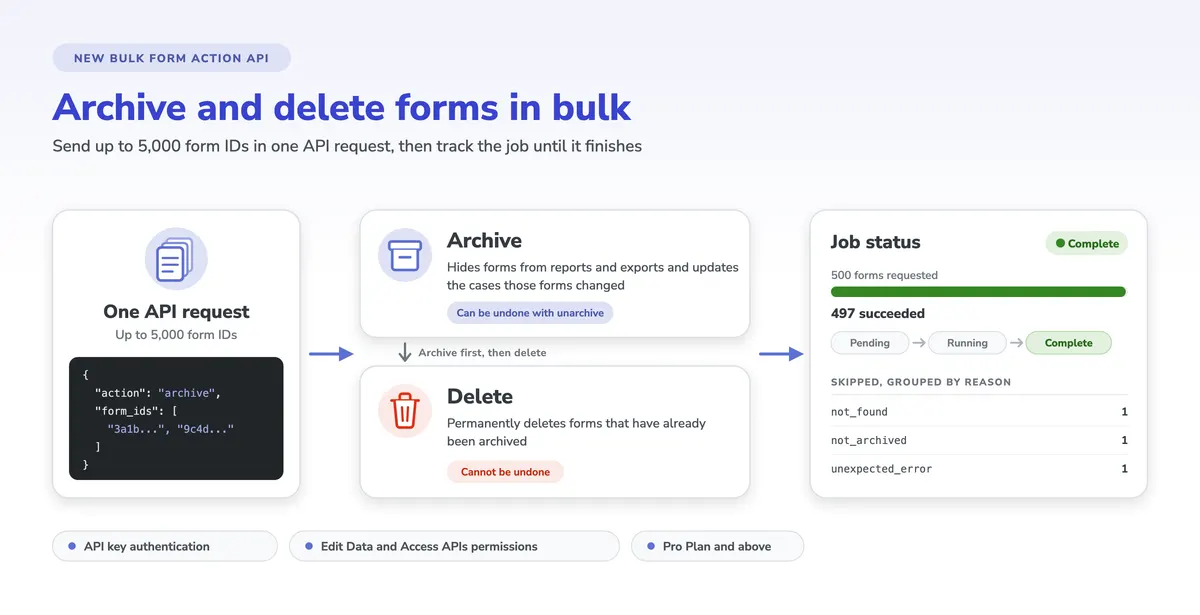
  • Nov 12ImprovementRemoved IVR reportsDetails
  • Nov 8ImprovementAdded deprecation warnings to exchangeDetails
  • Nov 4ImprovementRefactor user import validationDetails
  • Oct 30ImprovementEnsure submenu names don't override the parent menu nameDetails
  • Oct 21ImprovementChange message sms users receive when formplayer is stuckDetails
  • Oct 21ImprovementAdd X-FORMPLAYER-SESSION header for sticky sms form sessionsDetails
  • Oct 16ImprovementUse ES backend for Group API by defaultDetails
  • Oct 11ImprovementUpdates to CCUI bulk translations parameter validationDetails
  • Oct 11ImprovementChange response code for submission errors that are not recoverableDetails
  • Oct 10FixFix Case UCR Export by fixing DateSpan pickleDetails
  • Oct 10ImprovementPolished UI for EOF nav / case list reg warningDetails
  • Oct 9ImprovementDemote new build error back to a warningDetails
  • Oct 8FixFix cp_n_saved_scheduled_reports new scheduled report messageDetails
  • Oct 7ImprovementOptimize Group API resource URL callsDetails
  • Oct 4ImprovementLanguage filter for multimediaDetails
  • Oct 1FixFixed uncaught form validation errorsDetails
  • Sep 25FixFixed exception type for form source download URLDetails
  • Sep 19ImprovementRemove ghost roles from domain adminsDetails
  • Sep 18ImprovementInclude all SMSs, both incoming and outgoing in enterprise reportDetails
  • Sep 16ImprovementAddress issues with saved report filters (1 of 2)Details
  • Sep 16FixFix knockout logic for data dict description fieldsDetails
  • Sep 10ImprovementPaginate Group API in dbDetails
  • Sep 6FixFixed relevancy of child menus using display-only formsDetails
LET’S TALK

Want to see what’s new in action?