Who We Serve  /  Classroom  /  Syllabus

The Digital Health Syllabus

A free six-session teaching pack for faculty integrating CommCare into health, informatics, and global-health coursework. Run it as a half-semester course or pull the modules that fit yours.

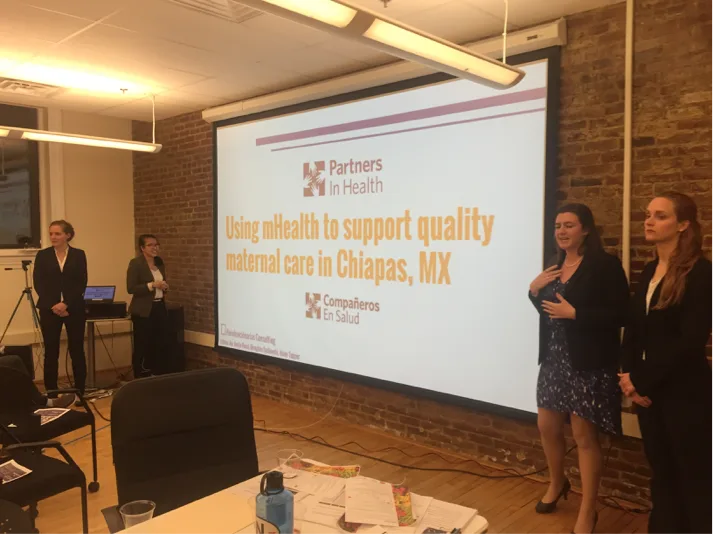
A university mHealth class presenting their CommCare project
Photo: Boston University School of Public Health

Syllabus chapters

1 · Overview

What this is, and how to teach it

A ready-to-teach pack for faculty bringing digital data collection into health, informatics, and global-health courses. It is built around CommCare, the open-source platform that frontline workers use to collect and manage data in the field.

Six three-hour sessions take students from the digital-health landscape to a working app they have built, tested, and presented, with a focus on low- and middle-income countries (LMICs). Teach all six as a half-semester course, or pull the sessions that fit, see adapting it to your course.

Students leave with practical, portable skills for careers in global health, monitoring and evaluation, and health informatics. We have refined this material over a decade with faculty across continents. Every session blends four threads:

Knowledge

The digital-health landscape, where CommCare fits, and the kinds of programs it powers.

Technical

Building forms and apps in CommCare, with logic, calculations, and validation rules.

Systems

Fitting a digital tool into a real workflow: process maps, terms of reference, and supportive supervision.

Professional

The teamwork, critique, and project management that real deployments demand.

2 · Sessions

Six sessions, built to flex

Teach all six in sequence for a half-semester course, or jump to the ones that fit yours.

For Faculty: How to adapt this syllabus to your course

Pick the sessions that fit your credit hours. Each row is a tested classroom configuration, paired with a module in Dimagi Academy.

CourseWhen it fitsTeach
BeginnersA single class (~2 hrs), or a digital-health overview.Session 1
Intermediate1-credit course, or a hands-on app-building workshop.Sessions 1-3
Advanced I2-3 credit course.Sessions 1-5
Advanced II4-credit course, or consulting for a real partner.Sessions 1-6 (with Dashboards)
Session 1 · Foundations

Mobile Technology & Health Overview

Lecture2-3 hours in-classNo prerequisites

A lecture on how mobile and digital tools are reshaping health systems. By the end, the class shares a common vocabulary and a working mental model of where CommCare fits.

Learning Objectives
  • Categorize the different ways digital and mobile technologies support health systems.
  • Describe trends and best practices in the use of mobile phones and tablets by community health workers.
  • Assess how technology components combine to support public-health programs.
  • Understand how CommCare works and identify the different types of CommCare users.
In-Class Activities
  • Walk through the digital-health landscape with the Dimagi-provided slide deck.
  • Introduce Dimagi Academy, the free, self-paced platform students use for homework throughout the course.
Session 2 · Build

Introduction to CommCare

Workshop~3 hours in-classFirst app-build

Students arrive having completed CommCare Fundamentals and immediately start building forms: the single questionnaires or workflows that are CommCare’s basic unit of data collection. By the end, every student has a working form they can launch on a phone.

Assignments Due
  • Complete CommCare Fundamentals in Dimagi Academy.
  • Complete modules 1, 2, and 3 of the CommCare Application Building course in Dimagi Academy.
Learning Objectives
  • Identify the basic steps of designing a digital-health program.
  • Develop basic forms using CommCare.
In-Class Activities

Build CommCare forms using one of the practice exercises below. The recommended workflow:

  1. Study the questions in the source form and figure out how many CommCare forms you need.
  2. Outline the flow of questions and the functions you’ll need.
  3. Build your forms in CommCareHQ, the web dashboard where apps are built, users are managed, and submitted data is reviewed.
  4. Be deliberate about transitions between questions and between forms.
  5. Launch on an Android phone and inspect how the data is captured on both ends.
PRACTICE 1

WHO STEPS Instrument for NCD Surveillance

WHO’s standardized tool for collecting risk-factor data on noncommunicable diseases (tobacco, alcohol, diet, physical activity, blood pressure, glucose). Strong starter project for form logic, units of measure, and validation conditions.

PRACTICE 2

WHO Verbal Autopsy Standards (2022)

A multi-section interview instrument used to determine probable cause of death where civil registration is incomplete. Excellent for practicing complex skip logic and conditional branching.

Session 3 · Plan

Terms of Reference & Process Mapping

Lecture + Workshop1 hr lecture · 2 hr workshopTeam formation

Session 3 introduces two tools every digital-health practitioner needs: Terms of Reference (the project contract) and process maps (the visual model of how a program runs). Teams form here and pick a real clinical protocol to build for.

Assignments Due
  • Complete modules 4 and 5 of the CommCare Application Building course (modules 1-3 are prerequisites).
Learning Objectives
  • Identify and gather information for a needs assessment using platforms such as GSMA.
  • Identify the steps of designing a digital-health project with process mapping.
  • Add multimedia and incorporate multiple languages into your application.
  • Identify your team members and your project Terms of Reference (ToR).
In-Class Activities
  • Mobile-application development workshop: basic form, skip logic, multimedia.
  • Team formation and review of project Terms of Reference.
  • Develop a process map using appropriate notation within each team.

In-class exercise. Application-building from a clinical protocol or case study. Teams pick one of the protocols below and present back to the class.

PRACTICE 1

WHO Safe Childbirth Checklist

An evidence-based checklist addressing the major causes of maternal death, intrapartum stillbirths, and neonatal deaths. Tested across ten countries in Africa and Asia.

PRACTICE 2

WHO Integrated Management of Childhood Illness (IMCI)

WHO’s flagship pediatric care algorithm, used across LMIC primary care to assess, classify, and treat sick children under five. A rich example of nested decision trees, danger-sign triage, and longitudinal follow-up.

PRACTICE 3

WHO Surgical Safety Checklist

A 19-item checklist developed to reduce errors and adverse events in surgery. Now used by a majority of surgical providers globally.

Session 4 · Refine

User Guides & Application Workshop

Lecture + Workshop30 min lecture · 90 min team workshopCase Management

Students learn CommCare’s case-management model, using cases (the persistent records that track an individual, household, or other entity across multiple visits) for longitudinal tracking, then add calculations and validations and write a user guide for the field worker who picks up the phone.

Assignments Due
  • Complete CommCare Calculation in Dimagi Academy.
  • Submit a process map for your case study (team or individual).
Learning Objectives
  • Explain case management in CommCare and identify the different types of cases.
  • Demonstrate how to use case properties; create a case list; open and close a case.
  • Use and build basic calculations, display logic, and validation conditions.
  • Create user guides for mobile application users in the field.
In-Class Activities
  • Workshop: case management in CommCare.
  • Logic and calculations using display and validation conditions.
  • Team-time for application development.
  • Create an audience-specific user guide on how data is collected and processed.
Session 5 · Ship

Student Presentations

Presentations10 min/team (3 min present + 2 min critique)Capstone

The capstone. Each team publishes their CommCare app to a phone or tablet, presents their use case and process map, then receives two minutes of structured peer critique.

Assignments Due
  • Final app prototype & testing instructions uploaded to the class shared space.
  • Final process map for your case study.
Learning Objectives
  • Publish a CommCare application to a phone or tablet.
  • Practice application critiquing within the class.
In-Class Activities
  • Use-case and process-map presentations, each team has 3 minutes to present, followed by 2 minutes of class critique.
  • Closing presentation on planning and implementing real digital-health programs using Dimagi resources.
Session 6 · Optional

Meaningful Use of Data & Implementation

Hands-on workshop2-3 hoursFor Advanced II courses

For 3-4 credit courses or teams consulting for a real partner. Adds advanced CommCare features and data-presentation skills so students can turn CommCare data into something a decision-maker can act on.

What students will do
  • Build a CommCare application using hidden values and complex calculations.
  • Identify data and monitoring needs for a digital-health program, and use data to inform quality-improvement activities.
  • Develop visually powerful data dashboards for specific decision-makers.
Dashboard tutorial

A one-page Excel visual that helps leaders spot trends and make decisions. Dimagi provides a tutorial with a sample dashboard and data. CommCare also has a native paid Dashboard product; for academic use, the Excel route works well.

FOR FACULTY

Bringing CommCare to your course?

Get in Touch